
Keeping students informed and engaged is the core job of any college communication system, and screens do it better than printed notices ever could. This guide explains what university digital signage is, why colleges adopt it, the benefits it delivers, the content that works best, and how to launch your first network. It is part of our wider resources on digital signage for education.

What is university digital signage?
University digital signage is a system of internet-connected displays controlled by software that lets a college publish content to one screen or hundreds at once. A small media player, such as an Apple TV, sits behind each screen and pulls content from the cloud. Staff update messages from a single dashboard, so a schedule change or alert reaches the whole campus in seconds.
The technology turns ordinary screens into flexible communication channels. Instead of printing and pinning paper, departments broadcast live announcements, looping playlists, and interactive content. Because students already treat screens as their primary source of information, digital signage for colleges meets them on familiar ground and earns attention that flyers rarely get.
Why use digital signage for colleges and universities?
Campus life moves fast, and important information is easy to miss. Digital signage for colleges solves that by making messages dynamic, current, and impossible to overlook. A single network can run event promotion in the student union, exam schedules in academic buildings, menus in dining halls, and emergency alerts everywhere at once.
There is also a practical case. Screens cut the recurring cost of printing and let one administrator manage communication across multiple buildings from a laptop. Colleges that move announcements onto screens also reduce paper, which supports campus sustainability goals. You can read how screens reduce campus paper waste for the full breakdown.
What are the benefits of digital signage for colleges?
Signage technology is versatile, so colleges can tailor it to their communication needs and budget. One screen can show different content types, and different locations can serve different purposes. Here are the main benefits of university digital signage for student engagement.
Timely update delivery
Student life is dynamic, and it is easy to miss important information and events. Digital signage gives colleges the ultimate tool for announcements, letting you instantly publish updates to your whole screen network or specific parts of it. Use it to broadcast schedules, event details, and key dates the moment they change.
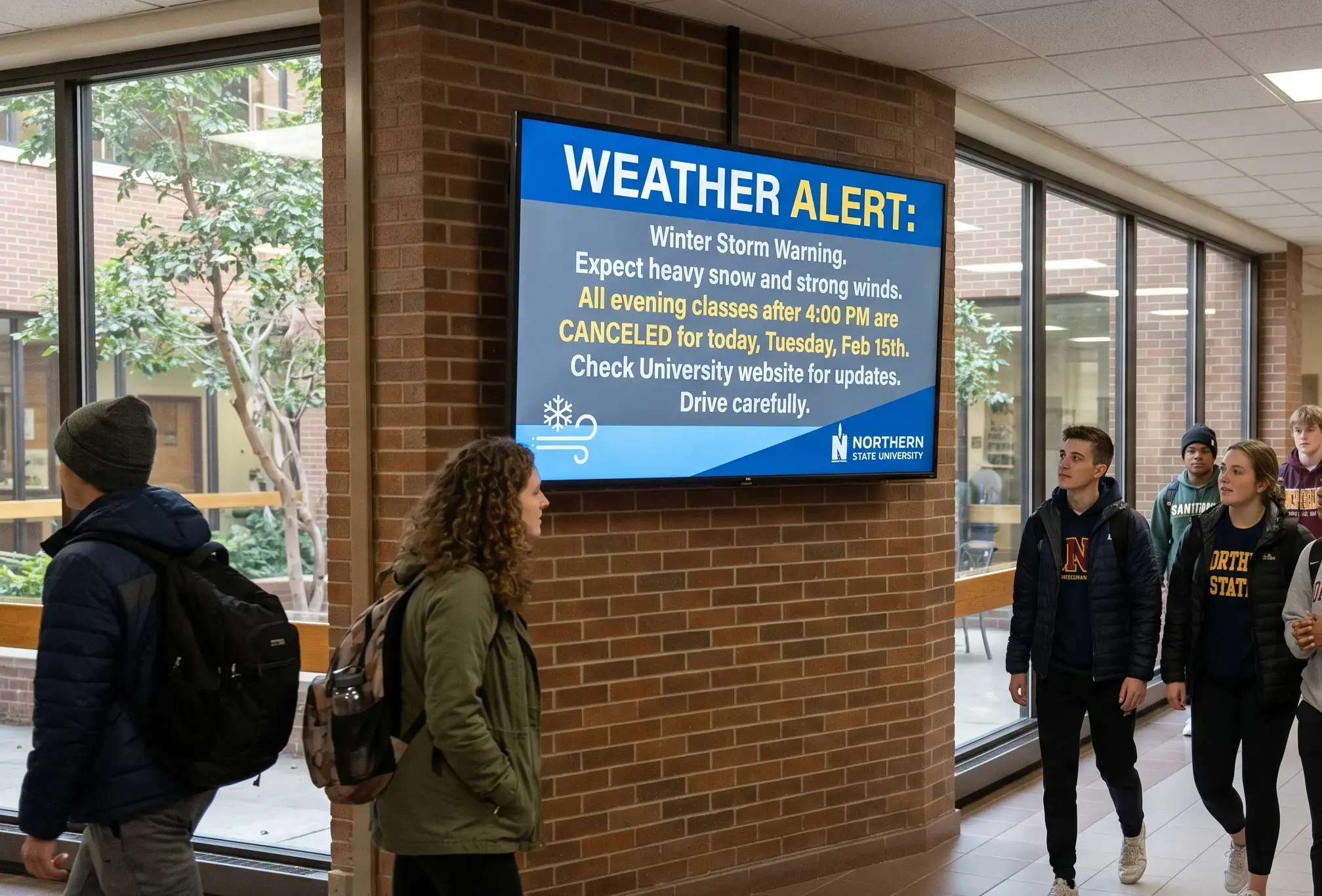
A reliable campus alerting system
When something is urgent, screens deliver. Display technology is ideal for emergency alerts because it is visual and gets the message across in seconds. Different situations can arise on campus, and it is always best to be prepared. A connected network lets you push safety instructions and evacuation guidance to every building at once, which strengthens campus security.
Shared management and student participation
One of the best ways to keep students engaged is to let them help create the content. With role-based access, you can assign permissions, build custom playlists, and enable shared participation. This is ideal for student-organized initiatives, clubs, and events, and it gives residence life teams a channel of their own. See how it works for residence hall communication.
Inclusive, adaptable content
The power of screens lies in adapting content to the audience. You can publish in multiple languages, tailor messages to specific student groups, and raise the relevance of everything you show. Subtitles, audio announcements, and high-contrast visuals make sure every group of students receives the message.
Interactive learning support
Most colleges already use technology in teaching, and screens paired with signage software make a strong companion to interactive education. Instructors can run sharper presentations, weave in gamification, and display QR codes that link to course material, turning a passive display into a participation tool.
What content works best on college and university screens?
Every institution is different. Some run mega campuses with hundreds of screens, while smaller colleges use a few displays for the most important announcements. The guiding principle is simple: students come first. Ask them what they want to see, gather feedback through QR codes or social media, then design content around the answers. Here are the content types that perform best with university digital signage.
Announcements
This is the most popular content type. Colleges use screens to display event news, schedule changes, emergency notices, and general campus information in one always-current feed.
Polls and quizzes
Interactive polls and quizzes keep students involved and signal that the institution cares about what they have to say. They are a quick way to turn a passive audience into an active one.
Social media feeds
Pulling a college Instagram account or hashtag-driven TikTok content onto screens boosts branding and pulls students into the content-creation loop. It connects the physical campus to the channels students already use.

Inspirational content
Quotes and motivational visuals add good energy between practical messages. They should not dominate the playlist, but a steady stream of positive content helps set the campus tone.
Wayfinding
Nobody enjoys getting lost, especially first-year students and visitors. Screens showing directions, maps, and room information make navigation effortless. This is one of the most popular campus uses, and our guide to campus wayfinding signage covers it in depth.
Weather, countdowns, and games
Weather updates pair well with event reminders when conditions affect attendees. Countdowns add urgency to a big game, exam, or guest lecture. And screens can power thematic quests and scavenger hunts that use the whole campus as a stage.
How do you start with university digital signage?
Getting started is faster than most IT teams expect. You need a screen, a media player such as an Apple TV streaming box, and signage software. Connect the player to the screen, install the app, link each display in the dashboard, and you are ready to publish. If you're starting from zero, our guide to what digital signage is covers the fundamentals in plain English.
A cloud-based platform means no expensive servers and no on-site maintenance, which matters when you are managing many buildings. Kitcast runs natively on Apple TV, supports Jamf MDM for fleet management, and includes emergency alerting, so it scales from a single department to a district-wide deployment. For a broader view across grade levels, see the benefits of digital signage for schools and universities. For a vendor-by-vendor comparison, see the best digital signage software for education.
FAQ
How much does university digital signage cost?
Cost depends on how many screens you deploy and the content you plan to run. The main variables are the displays themselves, a media player per screen, and a software subscription. Cloud-based platforms remove server and maintenance costs, so most colleges start small with a few screens and expand once the workflow is proven.
What hardware do colleges need for digital signage?
At minimum, each location needs a commercial or consumer screen and a small media player, such as an Apple TV, connected to it. The player runs the signage app and pulls content from the cloud, so no on-site server is required. Existing screens can often be reused.
Can students manage digital signage content?
Yes. Role-based permissions let administrators give students controlled access to specific screens or playlists. This is useful for clubs, residence life, and student government, allowing them to publish their own announcements while staff retain oversight of the wider network. Municipal and public-sector deployments follow the same pattern — see our government digital signage page.
Is digital signage good for campus emergency alerts?
Yes. Screens are highly visual and can display an alert across an entire network in seconds, which makes them effective for emergency communication. A connected system can push evacuation instructions and safety information to every building at once, supporting campus security plans.
How does digital signage help with campus wayfinding?
Digital wayfinding replaces static printed maps with searchable, always-current directions, floor plans, and room information. It helps new students, visitors, and staff navigate large campuses with multiple buildings, and the same screens can switch to emergency guidance when needed.
Can digital signage reduce paper use on campus?
Yes. Moving flyers, schedules, notices, and menus onto screens removes the need to print and reprint paper materials. Because content updates digitally, colleges cut both printing costs and paper waste, which supports campus sustainability goals.
Does university digital signage work with Apple TV?
Yes. Apple TV is a common media player for campus signage because it is affordable, reliable, and easy to manage at scale. Kitcast runs natively on Apple TV and supports Jamf MDM, so IT teams can deploy and monitor screens across the whole campus.
How is digital signage for colleges different from K-12 school signage?
The technology is the same, but the use cases differ. Colleges emphasize residence halls, student-run content, large-campus wayfinding, and event promotion across many buildings, while K-12 signage focuses more on centralized announcements and safety. Both benefit from cloud management and emergency alerting.
Conclusion
Internal Communications Digital Signage: Strategy, Content Ideas & Examples (2026)
6 Best Digital Signage Software for Education in 2026 (Compared)