Deep Dive: Feature-by-Feature Comparison
Ease of Use & Interface
Kitcast was built around one principle: get content on screens fast, without training. The dashboard is
intentionally minimal — no legacy UI clutter, no buried settings. Non-technical staff (marketing
managers, HR, office admins) can create and publish content in under 5 minutes with zero onboarding.
Yodeck offers a competent dashboard that covers a lot of ground. It is straightforward for basic tasks —
uploading media, creating playlists, assigning to screens. However, users on review platforms frequently
mention that the layout designer feels limited when building custom designs, and the interface can
become harder to navigate as you scale to more complex setups with multiple zones, playlists, and
schedules. G2 reviewers specifically call out "Learning Curve (70 mentions)" and "Complexity (68
mentions)" as common themes.
Verdict: Kitcast wins on UX polish and speed-to-first-screen. If your
team includes non-technical users who need to manage content independently, this gap matters in daily
operations.
Supported Devices & Platforms
This is where the two platforms diverge most sharply — not in quantity, but in philosophy.
Kitcast currently supports Apple TV,
Android TV, Amazon Fire TV/Fire OS, BrightSign, LG WebOS, Samsung Smart TV, ChromeOS, macOS, and iOS —
with Windows, Linux, and Raspberry Pi on the roadmap. Kitcast takes a curated approach: rather than
supporting every device with a generic web layer, Kitcast builds native or deeply optimized apps for
each platform. The result is noticeably smoother performance, better animations, and more reliable 24/7
operation.
Yodeck was built around Raspberry Pi and has expanded to Android, Fire TV, Windows,
BrightSign, Samsung Tizen, LG WebOS, and a Web Player. Yodeck's notable exclusion: no Apple TV, no
macOS, no iOS, no ChromeOS. If your organization runs Apple hardware — which many schools, universities,
and creative agencies do — Yodeck is simply not an option.
Verdict: Different platform mixes. Kitcast is the only choice if you
use Apple TV. Yodeck is the only choice if you need Windows or Raspberry Pi today. Choose based on your
existing hardware, not raw device count.
Content Creation & Templates
Both platforms offer 500+ templates for common use cases: menus, directories, event boards, corporate
comms, and more. The full digital signage features page shows what ships beyond templates — scheduling, SSO, proof of play, offline playback.
Kitcast offers two content creation paths. The Template Builder lets you customize
static graphic designs from the 500+ template library. Smart Templates go further — these are natively
animated, dynamic templates built specifically for tvOS. Widgets (weather, social feeds, news,
calendars) run as native components, not rendered images. This means smoother animations, faster
loading, and more reliable playback. Kitcast reports approximately 99.9% crash-free stability.
Yodeck provides 500+ free templates with a layout editor and embedded Canva integration
directly in the dashboard. This makes it easy for non-designers to create menu boards, promotional
content, and branded layouts without external tools.
Verdict: Kitcast wins on animated, native template quality. Yodeck
wins on Canva integration and freeform editing directly in the dashboard. Both are strong for common use
cases.
AI Features
Both platforms have addressed AI-powered content creation differently.
Kitcast offers prompt-based content generation: describe what you want (e.g., "coffee
shop lunch special with warm tones"), and the AI generates a background image and text layout. You can
upload your logo on top. It is a practical tool for teams without a dedicated designer.
Yodeck does not position AI content generation as a core feature. The platform relies on
its Canva integration for design flexibility instead.
Verdict: Kitcast has a clear edge in AI content generation. For teams
that need quick, design-free content creation, this is a differentiator.
Scheduling & Playlist Management
Both platforms support playlist creation, content scheduling, recurring schedules, and time-zone-aware
publishing.
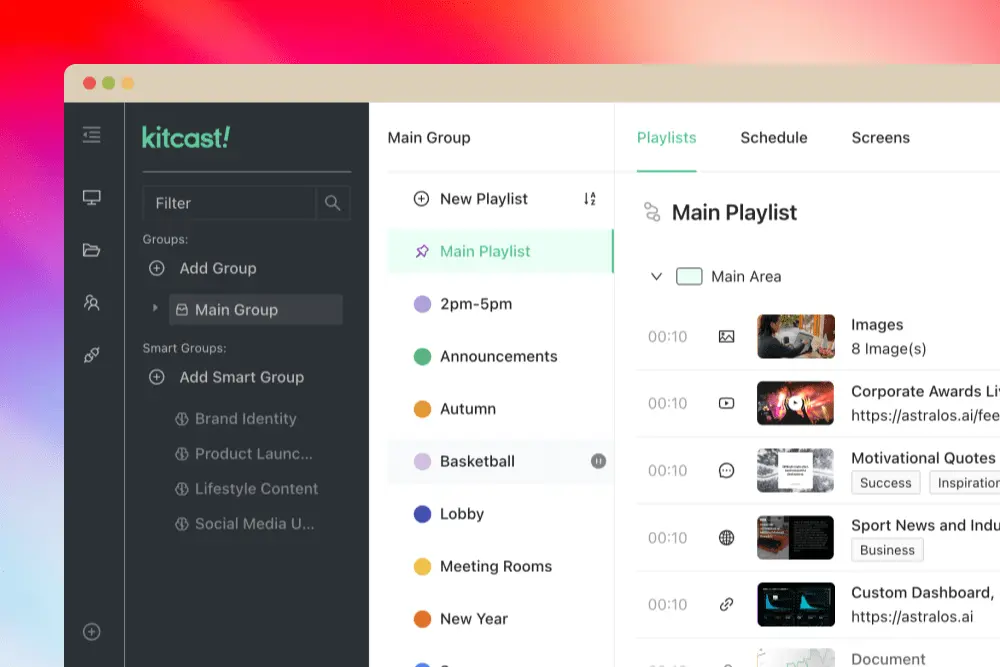
Kitcast keeps scheduling visual and straightforward — create a playlist, drag content
in, set time slots. Multiple playlists can sync across screen groups — essential for teams managing digital
signage across multiple locations.
Yodeck offers similar scheduling capabilities with dayparting and recurring schedules.
The Premium plan ($11/mo) adds tag-based playlists and sub-playlists for more advanced content
organization.
Verdict: Functionally similar. Kitcast's UX makes it more likely your
team will actually keep content fresh. Yodeck's Premium adds helpful organizational features.
Offline Playback & Reliability
This is a significant differentiator.
Kitcast fully caches all content locally on the device. When internet drops, screens
keep playing indefinitely. When connectivity returns, updates sync automatically. This is not
theoretical — Kitcast customers run screens on cruise ships crossing the ocean with no internet for
days, and at live events where venue WiFi is nonexistent.
Yodeck supports offline playback, but with a limitation: content plays for up to 35 days
without internet. After 35 days, the player requires reconnection. For most scenarios this is
sufficient, but for extended offline deployments, it is a constraint.
Verdict: Kitcast wins clearly. If indefinite offline reliability is a
requirement — events, hospitality, cruise ships, remote locations — this is a deciding factor.
Enterprise & Security Features
This is where Kitcast's value proposition becomes stark at the pricing level.
At the $10/month tier, a Kitcast Pro user gets SSO, API, SCIM, audit logs, proof-of-play, MDM integration,
and real-time monitoring with offline alerts. A Yodeck user at $11/month (Premium) gets API and
proof-of-play — but no SSO, no custom roles, no audit logs, no SCIM. To match Kitcast Pro's governance stack
on Yodeck, you need the Enterprise plan at $15/screen/mo.
Proof-of-play
deserves
attention. If you need to verify that specific content actually played on specific screens at specific times
— for compliance, ad verification, or internal accountability — this is non-negotiable. Kitcast includes it
in Pro ($10/mo). Yodeck includes it in Premium ($11/mo). Both are accessible, though Kitcast bundles it with
the full governance stack.
SCIM provisioning is another differentiator. If your organization uses an identity provider
(Okta, Azure AD, OneLogin), SCIM automates user provisioning and deprovisioning. Kitcast includes this at
$10/mo. Yodeck supports SCIM (Azure EntraID, Okta, OneLogin) but only on the Enterprise plan at $15/mo. For
a 50-screen deployment, that difference is $250/mo or $3,000/year.
This is critical in environments like hospitals, where screen downtime can impact patient experience and safety.
Verdict: Kitcast delivers enterprise-grade security and governance at
mid-tier pricing. For IT teams and security-conscious organizations, this alone can justify the switch.
These governance features are especially valued in regulated industries like healthcare, finance, and manufacturing. Our digital signage for manufacturing page covers those regulated-environment requirements in practice.
Integrations & API
Kitcast integrates with Canva, Google Calendar, Instagram, Facebook, TikTok, X (Twitter),
Yelp, TripAdvisor, YouTube, RSS feeds, and more. The API is included in the Pro plan ($10/mo), enabling
custom integrations and automation. MDM tools (Jamf, Mosyle, Kandji) are supported for Apple TV fleet
management.
Yodeck offers 80+ apps and integrations, including Canva, Google Calendar, Microsoft Teams,
Power BI, Grafana, Tableau, SharePoint, social media feeds, weather, clocks, QR codes, and more. The API is
available on the Premium plan ($11/mo). Yodeck also supports custom app uploads and auto-updating playlists
from Google Drive, Dropbox, and OneDrive.
Verdict: Yodeck has a broader selection of built-in apps and
integrations, particularly for Microsoft ecosystem tools (Teams, SharePoint, Power BI). Kitcast's API is
$1/mo cheaper. For most common use cases, both platforms cover the essentials.
Hardware: Raspberry Pi vs BYOD
This is the philosophical divide between the two platforms.
Yodeck's model: They ship you a free, preconfigured Raspberry Pi player (1GB with Basic, 4GB
with Premium/Enterprise) when you choose an annual subscription. For organizations starting from scratch
with no existing hardware, this eliminates upfront device costs. The trade-offs: SD card reliability
(corruption is a documented issue), thermal management (overheating in enclosed spaces), and a $1/month
"Assurance" add-on for hardware replacement — which suggests failure is common enough to warrant insurance.
Kitcast's model: Bring Your Own Device. Run Kitcast on Apple TV ($199), Amazon Fire TV
Stick ($30–50), Android TV, BrightSign, Samsung Smart TV, LG WebOS, or any other supported device. If a
device fails, you replace it with any off-the-shelf unit from any retailer. No vendor lock-in to proprietary
hardware.
Verdict: Yodeck's free hardware is a genuine advantage for cost-sensitive
deployments starting from zero. But for organizations that already own devices (especially Apple TVs), or
that prioritize long-term reliability over upfront savings, Kitcast's BYOD model avoids the risks associated
with Raspberry Pi hardware.
Customer Support
Kitcast treats support as a core product feature. Every customer — whether running 1 screen
or 1,000 — gets the same level of hands-on, responsive support. The team actively helps with setup,
troubleshooting, and migration.
Yodeck provides free online support to all customers, including free-plan users (though paid
accounts are prioritized). Priority SLA support (1-hour response time, 24/5) is reserved for Enterprise+
plans. Yodeck also offers a Knowledge Base, video tutorials, and a Yodeck Academy with webinars.
Verdict: Kitcast provides more personalized, hands-on support at every
tier. Yodeck has more self-service resources and documentation. For organizations that value direct human
support without tier gates, Kitcast wins.
Pricing Breakdown (2026)
Both platforms offer monthly and annual billing. Here's how they compare at each tier.
⚠ Important: Yodeck has announced that pricing changes will take effect in April 2026.
The prices below reflect current (pre-increase) rates.
Kitcast special offers: Significant discounts for Education, Non-Profit, First Responders,
and Government organizations. Dedicated "Switch & Save" program for teams migrating from other
platforms. No credit card required for 14-day trial. For public-sector deployments specifically, see our government digital signage page.
Yodeck: Free Raspberry Pi hardware with annual plans. Education/non-profit discounts not
publicly listed.
For organizations that need SSO, audit logs, and custom roles, Kitcast Pro saves $3,000/year
on a 50-screen deployment compared to Yodeck Enterprise. Even accounting for BYOD hardware costs (a one-time
purchase), Kitcast breaks even in under a year and saves money every year after.
EDU, Non-Profit & Government Discounts
Kitcast has a large education customer base (colleges, K-12 schools, universities including
Stanford and PennState) and offers significant discounts — sometimes dramatically lower than list price.
First responders and non-profits receive substantial discounts as well. Many schools already have Apple TVs
in classrooms for AirPlay. Kitcast lets them dual-use those devices: AirPlay during class, digital signage
when idle (or locked into single app mode for always-on signage).
Yodeck does not publicly list education or non-profit discount programs, though custom
pricing may be available for large deployments.
Verdict: If you are in education or non-profit, contact Kitcast directly.
The savings can be significant — especially when combined with Apple TVs you already own.
Real-World Scenarios
Schools & Universities
Schools typically have tight budgets, limited IT staff, and — critically — existing Apple TV
infrastructure. This is where the Kitcast vs Yodeck comparison becomes straightforward: Yodeck does not
support Apple TV. Full stop. Kitcast is purpose-built for this scenario: existing Apple TVs become
digital signage displays with a 5-minute setup. MDM integration (Jamf, Mosyle, Kandji) means IT can
deploy and manage hundreds of screens from a single console. When classrooms need AirPlay, the Apple TV
switches modes seamlessly. Non-technical staff — teachers, administrators, communications directors —
can update content without IT involvement.
Emergency alerts (CAP): Kitcast supports Common Alerting Protocol (CAP) integration, which
means screens can instantly switch to emergency messaging — lockdown notices, evacuation instructions,
weather alerts — overriding scheduled content. For K-12 and university campuses, this is increasingly a
compliance requirement. Yodeck also supports CAP alerts.
Yodeck can work for schools using Android devices, Fire TV Sticks, or Raspberry Pi, and offers zero-touch
deployment with its preconfigured players. But without Apple TV support and Apple MDM integration,
schools with Apple infrastructure face a harder path.
Best fit: Kitcast — especially if the school already owns
Apple TVs (and most do).
Read more in our complete guide to digital signage for schools and universities.
Corporate Offices
Corporate environments need brand consistency, security compliance (SSO, audit logs), and the ability for
multiple departments (HR, Marketing, Facilities) to manage their own screens. Kitcast Pro gives all of
this at $10/screen/mo. The clean, modern UI ensures lobby screens, meeting room
displays, and breakroom boards all look polished — reflecting your company's brand.
Yodeck can serve corporate signage needs effectively, especially for organizations already using
Microsoft ecosystem tools (Teams, SharePoint, Power BI integration on Premium plan). However, SSO and
custom user roles require the Enterprise plan at $15/screen/mo, which creates friction for IT teams
evaluating budget.
Best fit: Kitcast for brand-conscious, security-first corporate teams. Yodeck for
Microsoft-heavy environments where Power BI and Teams integration outweigh the SSO cost difference.
See our full review of corporate digital signage software for 2026.
Retail & Restaurants
Retail and food service require fast content updates (flash sales, daily specials), reliable offline
playback (in case of WiFi issues during a lunch rush), and attractive templates that look professional
without a designer. Kitcast's 500+ templates, AI content generation, and indefinite offline caching
cover all three.
Yodeck is popular with restaurants and small retail businesses — its free single-screen plan is ideal for
a single menu board, and the $8/screen price point works for budget-conscious multi-location rollouts.
Canva integration makes it easy for non-designers to create menu
boards and promotional content.
Best fit: Kitcast for premium retail/restaurant branding where visual quality and offline reliability
are paramount. Yodeck for budget-first multi-location rollouts and small businesses starting with a free
screen.
Hospitality & Events
Hotels, conference centers, and event venues often need offline reliability (event spaces frequently have
no WiFi), quick setup/teardown, and content that looks premium. Kitcast's offline caching is proven in
extreme scenarios: cruise ships at sea, pop-up events, conference booths. Load content, disconnect,
deploy. The device keeps playing indefinitely without connectivity.
Yodeck's 35-day offline cap is sufficient for most hospitality scenarios, but not for extended
deployments in fully disconnected environments.
Best fit: Kitcast — indefinite offline reliability is a deciding factor in hospitality
and events.