Kitcast vs ScreenCloud (2026): Which Digital Signage Platform Wins?
⚡ TL;DR — Quick Verdict
The best ScreenCloud alternative in 2026 is Kitcast. It starts at $7/screen/month (vs ScreenCloud's $20), runs natively on Apple TV, Android, Fire TV, and BrightSign, and includes SSO, API access, and audit logs at the Pro tier ($10/mo) — features ScreenCloud locks behind Enterprise pricing.
ScreenCloud is a solid enterprise digital signage platform — but it costs $20–$30 per screen per month, requires dedicated hardware procurement, and gates most advanced features behind its Enterprise tier.
If your team already has Apple TVs deployed for AirPlay or conference rooms, switching to Kitcast digital signage is often a same-day migration — no new hardware, no procurement cycle, no added cost. For organizations managing 10–500 screens with a focus on clean UX and enterprise governance without enterprise pricing, Kitcast consistently wins.
Comparison Highlights
- Price gap: Kitcast starts at $7/screen/mo vs ScreenCloud at $20/screen/mo — 65% cheaper at the entry tier. On 50 screens, that's $7,800/year in savings.
- Apple TV: Kitcast is built natively on tvOS — in the Apple TV App Store from day one. ScreenCloud runs via a web-based wrapper on Apple TV.
- Hardware: ScreenCloud requires you to procure and manage dedicated signage hardware. Kitcast works on Apple TVs, Fire TV sticks, Android TVs, and BrightSign devices your team already owns.
- Enterprise features: SSO, API, SCIM, and audit logs are included in Kitcast Pro ($10/mo). ScreenCloud requires Enterprise (contact sales) for equivalent governance.
- Setup: Kitcast is live in ~5 minutes on any supported device. ScreenCloud setup averages 30–60 minutes depending on hardware configuration.
- EDU pricing: Kitcast offers significant discounts for schools and universities. ScreenCloud's EDU pricing requires a sales conversation.
- Offline playback: Kitcast fully caches content locally — works without internet entirely. ScreenCloud has limited offline support and streams YouTube content rather than caching it.
- Support: Kitcast provides hands-on support at every tier. ScreenCloud's dedicated support is gated behind higher plans.
Who Should Choose Kitcast
✅ Choose Kitcast if you…
- Are scaling beyond 10 screens and want pricing that doesn't compound. At $7/screen/mo, 50 screens cost $350/mo vs ScreenCloud's $1,000/mo.
- Need SSO, API access, and audit logs without paying for an Enterprise tier. Kitcast Pro includes all of this at $10/screen/mo.
- Want a clean, modern interface that non-technical staff (marketing, HR, office admins) can use independently without training.
- Need live data and real-time metrics on screens — Kitcast supports live data feeds on Apple TV, Android, Fire TV, and other devices.
- Operate screens in locations with unstable connectivity — events, warehouses, remote sites. Kitcast caches content fully offline.
- Want hands-on customer support regardless of account size.
- Already have Apple TVs, Fire TVs, or Android TVs deployed — Kitcast runs natively on all of them, no new hardware needed.
🔵 Choose ScreenCloud if you…
- Already have ScreenCloud hardware deployed and the ROI of switching doesn't outweigh the transition cost.
- Need complex multi-display setups: video walls composed of many panels, or large-format tiled displays that require advanced layout configuration.
- Require touchscreen and interactive kiosk functionality as a core use case.
- Need Raspberry Pi or Linux-based player support.
- Require space-based billing and organizational hierarchy for multi-location enterprise deployments with thousands of screens.
Side-by-Side Comparison Table
Here's how the two platforms stack up across the criteria that matter most.
| Criteria |  |
ScreenCloud |
|---|---|---|
| Starting price | $7/screen/mo (annual) | $20/screen/mo |
| Pro/advanced tier | $10/screen/mo | $30/screen/mo |
| Enterprise | Contact sales | Contact sales |
| Free trial | 14 days, no credit card | 14 days |
| Free plan | No | No |
| Apple TV support | Native tvOS app, 8+ years | Web-based wrapper |
| Supported devices | Apple TV, Android, Fire TV, BrightSign, LG WebOS, Samsung, ChromeOS, macOS, iOS | Android, Fire TV, Apple TV, Windows, Linux, BrightSign, Raspberry Pi |
| Hardware required | Works on existing devices | Works on existing devices + ScreenCloud-recommended hardware |
| UI / ease of use | Clean, minimal, fast onboarding | Feature-rich, steeper learning curve at scale |
| Templates | 500+ with animated Smart Templates | Pre-designed templates via Canvas editor |
| AI content generation | Yes — text, images, backgrounds via prompt | No native AI content generation |
| Offline playback | Full local caching; works without internet entirely | Limited; YouTube streams (not downloaded) |
| MDM integration | Jamf, Mosyle, Kandji — zero-touch deployment | Jamf supported |
| SSO (SAML) | Pro plan ($10/mo) | Enterprise (contact sales) |
| API access | Pro plan ($10/mo) | Enterprise (contact sales) |
| SCIM provisioning | Pro plan ($10/mo) | Enterprise (contact sales) |
| Audit log | Yes | Enterprise only |
| Role-based access | All plans | Yes (varies by plan) |
| Proof-of-play reporting | Pro plan ($10/mo) | Pro plan ($30/mo) |
| Broadcast / screen override | Yes — Override feature | Yes — Broadcast feature |
| GDPR compliance | Yes | Yes |
| EDU / non-profit discounts | Yes — significant | Contact sales |
| Setup time | ~5 minutes | 30–60 minutes (varies by device) |
| Customer support | Hands-on at every tier | Gated by plan |
| Enterprise clients | Disney, New York Times, UPenn, McLaren, Delta Dental | Unilever, Superdrug, Pepsi |
Deep Dive: Feature-by-Feature Comparison
Pricing: The Biggest Differentiator
ScreenCloud's pricing model sounds reasonable at one screen. It becomes a serious budget line item as you scale.
At 10 screens: $200/mo (ScreenCloud Core) vs $70/mo (Kitcast Starter) — $1,560/year
difference.
At 50 screens: $1,000/mo vs $350/mo — $7,800/year difference.
At 100
screens: $2,000/mo vs $700/mo — $15,600/year difference.
For schools, hospitals, and multi-location retail brands managing dozens to hundreds of screens, this isn't a rounding error — it's a meaningful budget decision. Many Kitcast customers cite pricing as the primary reason they moved away from ScreenCloud.
Verdict: Kitcast wins on pricing at every scale.
Apple TV: Native App vs Web Wrapper
This is the most technically meaningful difference for Apple TV environments.
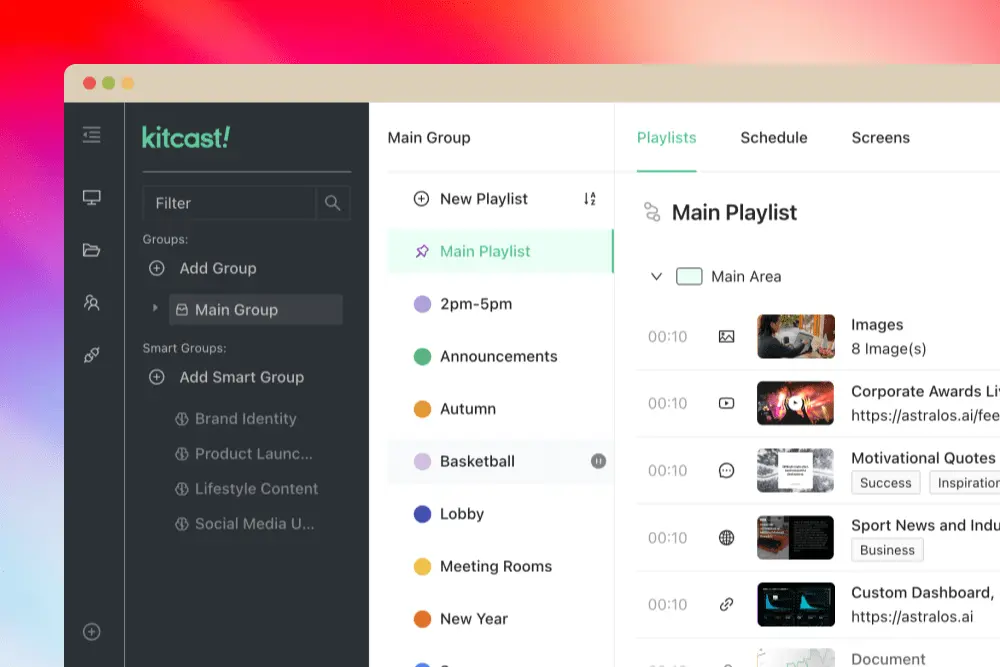
Kitcast was the first digital signage app in the Apple TV App Store, launching on day one in October 2015, built from a pre-release Apple dev kit under NDA. The app is App Store-certified, integrates with MDM tools (Jamf, Mosyle, Kandji) for zero-touch provisioning, supports single-app mode, and handles AirPlay/signage switching seamlessly. Content is cached locally, which means playback continues even if the network drops.
ScreenCloud supports Apple TV through a web-based wrapper — effectively a browser rendering content on the TV. The experience works, but it lacks the native performance, MDM depth, and offline reliability of a purpose-built tvOS application.
Why this matters in practice: Many organizations — especially schools, corporate offices, and hospitality venues — already have Apple TVs deployed for AirPlay and conference room use. Kitcast can transform those same devices into managed digital signage displays without any new hardware procurement. ScreenCloud requires the same Apple TV hardware but delivers a more limited native experience.
Verdict: Kitcast wins for Apple TV environments, especially for MDM-managed deployments.
Hardware Flexibility
Both platforms are hardware-agnostic in principle. The practical difference is in what your team already owns.
ScreenCloud recommends its own hardware configurations (specific Android sticks, BrightSign players) and the setup experience is optimized for those. Teams that need to deploy on existing Apple TVs, Fire TV sticks, or Android TVs they already have in warehouses often find Kitcast's zero-configuration approach faster.
One common scenario we see: companies previously using ScreenCloud with dedicated signage hardware, then discovering they already had Apple TVs deployed for other purposes. Switching to Kitcast meant repurposing existing devices — no hardware budget, no procurement cycle, same-day migration.
Verdict: Tie — both support broad hardware. Kitcast wins for Apple TV reuse scenarios.
Enterprise Features & Governance
This is where pricing divergence becomes most significant.
| Feature | Kitcast Plan | ScreenCloud Plan |
|---|---|---|
| SSO (SAML) | Pro ($10/mo) | Enterprise (contact sales) |
| API access | Pro ($10/mo) | Enterprise (contact sales) |
| SCIM user provisioning | Pro ($10/mo) | Enterprise (contact sales) |
| Audit log | Pro ($10/mo) | Enterprise (contact sales) |
| Proof-of-play reporting | Pro ($10/mo) | Pro ($30/mo) |
| Monitoring & offline alerts | Pro ($10/mo) | Varies by plan |
| Role-based access | All plans | Yes (varies by plan) |
| MDM (Jamf, Mosyle, Kandji) | Pro ($10/mo) | Jamf supported |
| Zero-touch deployment | Pro ($10/mo) | Varies by plan |
| Broadcast / screen override | Yes | Yes |
| GDPR | Yes | Yes |
| Encryption | Yes (transit + rest) | Yes |
| White label | Enterprise | Enterprise |
| Dedicated onboarding | Enterprise | Enterprise |
Kitcast Pro at $10/screen/month includes: SSO (SAML), REST API, SCIM user provisioning, role-based access control, audit log, proof-of-play reporting, and monitoring alerts.
ScreenCloud's equivalent governance features (SSO, API, SCIM) require the Enterprise tier — which means a sales conversation and custom pricing. Their Pro plan at $30/month includes dashboards and premium apps, but not the identity and access management features that IT and security teams require.
For IT administrators evaluating signage platforms, this matters: Kitcast lets you trial the full enterprise security stack before you commit. ScreenCloud requires you to commit to Enterprise to evaluate it.
Verdict: Kitcast wins — enterprise governance included at a lower price point. These governance features are especially valued in regulated industries like healthcare and manufacturing.
Content Creation & Integrations
Both platforms offer strong integration ecosystems. Kitcast supports live data feeds, real-time metrics, and dynamic content on any supported device — including Apple TV. The platform also includes AI-powered content generation (text, images, backgrounds via prompt), 500+ templates with native animations, and workspaces with granular role-based access for multi-team content operations.
ScreenCloud's Canvas editor is solid for teams with advanced design needs, and their GraphQL API supports custom data sources. Where ScreenCloud has an edge: deep integration with Slack, Excel, and Google Suite out-of-the-box, and their "Broadcast" feature for company-wide screen takeovers.
Verdict: Comparable integration depth. Kitcast leads on AI content generation and live data on Apple TV. ScreenCloud leads on enterprise broadcast and Canvas design flexibility.

Offline Playback
Kitcast caches all content locally on the device. If the internet goes down, screens keep playing. This is critical for venues with unreliable connectivity: event spaces, warehouses, cruise ships, remote office locations.
ScreenCloud has basic offline support for static content, but YouTube videos are streamed rather than downloaded — which means data consumption is ongoing and playback fails without connectivity.
Verdict: Kitcast wins for offline-first environments.