Kitcast vs OptiSigns (2026): Which Digital Signage Platform Is Right for You?
⚡ TL;DR — Quick Verdict
Comparing digital signage software options? This page covers Kitcast vs OptiSigns in detail.
Kitcast is the stronger choice for teams that prioritize a polished interface, native Apple TV performance (with full support for Android, Fire TV, BrightSign, and more), and enterprise-grade security (SSO, MDM, role-based access) at every pricing tier. OptiSigns covers a few more hardware platforms, such as legacy Windows PCs, Roku, and Raspberry Pi — and carries a larger volume of third-party reviews.
Pricing is now comparable: Kitcast starts at $7/screen/mo vs OptiSigns at $9/screen/mo with annual billing. For schools, corporate offices, and brand-conscious deployments, Kitcast delivers more value per dollar. For quick, budget-first rollouts on niche legacy hardware, OptiSigns gets the job done. Both offer 14-day free trials so you can test before committing.
Comparison Highlights
- Price: Kitcast Starter ($7/mo) undercuts OptiSigns Standard ($10/mo) by 30%.
- Apple TV: Kitcast has 8+ years of native tvOS development; OptiSigns runs a web-based wrapper.
- Platforms: OptiSigns supports 15+ device types. Kitcast supports 10+ now, with Windows, Linux, and Raspberry Pi coming soon.
- SSO & API: Included in Kitcast Pro ($10/mo). OptiSigns locks SSO behind Pro Plus ($15/mo) and API behind Enterprise ($45/mo).
- MDM: Both support Jamf Pro for Apple TV mass deployment. Kitcast additionally integrates with Mosyle and Kandji, and its 8+ years of native tvOS development mean deeper MDM workflows — including zero-touch provisioning, single app mode, and seamless AirPlay/signage switching. OptiSigns added Jamf support more recently.
- Templates: Both offer 500+ templates. Kitcast's Smart Templates are natively animated on tvOS; OptiSigns relies on its Canvas editor for custom design. For the complete Kitcast side of this comparison, see the full digital signage features breakdown.
- Offline Mode: Kitcast fully caches content locally — works on cruise ships and event venues with zero internet. OptiSigns offers basic offline support.
- Support: Kitcast provides hands-on support at every tier. OptiSigns gates dedicated support behind higher plans.
- Enterprise Clients: Kitcast is used by Apple, Disney, Tesla, Walmart, Nike, Stanford, and T-Mobile. OptiSigns counts Yamaha, Red Bull, and Instacart.
- Governance in one tier: Kitcast Pro ($10/mo) bundles SSO, API, SCIM, audit log, proof-of-play, and monitoring. OptiSigns fragments these across 3–4 tiers ($15–$45/mo).
- Vendor stability: Kitcast is an active C-Corp founded in 2014, headquartered in Mountain View, CA with presence in Austin, TX. 11 years in market.
Who Should Choose Kitcast
✅ Choose Kitcast if you…
- Need to get screens live fast — on any device — without training, IT tickets, or complex setup.
- Want SSO, API access, audit logs, and role-based permissions without paying enterprise-tier pricing.
- Manage screens across schools and universities or corporate offices where brand presentation matters.
- Value a clean, modern dashboard that non-technical staff can learn in minutes.
- Operate screens in offline or low-connectivity environments (events, cruise ships, remote locations).
- Want hands-on customer support regardless of your plan size.
- Run Apple TV? Even better — Kitcast has 8+ years of native tvOS development and integrates with Jamf, Mosyle, and Kandji for zero-touch provisioning at scale.
🔵 Choose OptiSigns if you…
- Need to run signage on Raspberry Pi, Roku, or older Windows machines you already own.
- Want the most hardware flexibility possible and plan to mix many device types.
- Are comfortable with a more utilitarian interface in exchange for broad device support.
- Need interactive kiosk or touchscreen functionality (available on OptiSigns Engage plan).
- Want a free plan for up to 3 screens to test basic signage before committing to a paid tier.
Side-by-Side Comparison Table
Here's how the two platforms stack up across the criteria that matter most.
| Criteria |  |  |
|---|---|---|
| Starting price | $9/screen/mo ($7 annual) | $10/screen/mo ($9 annual) |
| Free trial | 14 days, no credit card | 14 days |
| Supported platforms | 10+ (Apple TV, Android, Fire TV, BrightSign, LG WebOS, Samsung, ChromeOS, macOS, iOS) | 15+ (adds Raspberry Pi, Windows, Linux, Roku, ARM Linux) |
| Native Apple TV app | Yes — 8+ years, built on tvOS | Yes — web-based wrapper |
| UI / ease of use | Clean, modern, minimal learning curve | Functional, can feel cluttered at scale |
| Templates | 500+ (including animated Smart Templates) | 500+ with Canvas drag-and-drop editor |
| AI content generation | Yes — text, images, backgrounds via prompt | Yes — AI Designer |
| Offline playback | Full local caching; works without internet entirely | Basic offline; content cached but more limited |
| MDM integration | Jamf, Mosyle, Kandji — zero-touch deployment | Varies by plan |
| SSO (SAML) | Pro plan ($10/mo) | Pro Plus plan ($15/mo) |
| API access | Pro plan ($10/mo) | Enterprise plan ($45/mo) |
| Role-based access | Yes (all plans) | Yes (varies by plan) |
| SCIM provisioning | Pro plan ($10/mo) | Enterprise plan ($45/mo) |
| GDPR compliance | Yes | Yes |
| Encryption (transit/rest) | Yes | Yes |
| Proof-of-play reporting | Pro plan ($10/mo) | Enterprise plan ($45/mo) |
| Audit log | Yes | Enterprise plan ($45/mo) |
| Monitoring & alerts | Pro plan (screen status, offline alerts) | Varies by plan |
| Customer support | Hands-on at every tier; live support | Email/phone; dedicated support on higher tiers |
| Enterprise clients | Apple, Disney, Tesla, Walmart, Nike, Stanford, T-Mobile | Yamaha, Red Bull, Instacart |
| EDU / non-profit discounts | Yes — significant discounts available | Yes — non-profit discounts |
| Setup time | ~5 minutes (download app → pair → publish) | ~15–30 minutes (varies by device and config) |
| Video wall support | Yes | Yes ($25/mo add-on) |
| Interactive kiosks | Not a focus | Yes (Engage plan, $30/mo) |
| White label / branding | Enterprise plan | Enterprise plan |
Deep Dive: Feature-by-Feature Comparison
Ease of Use & Interface
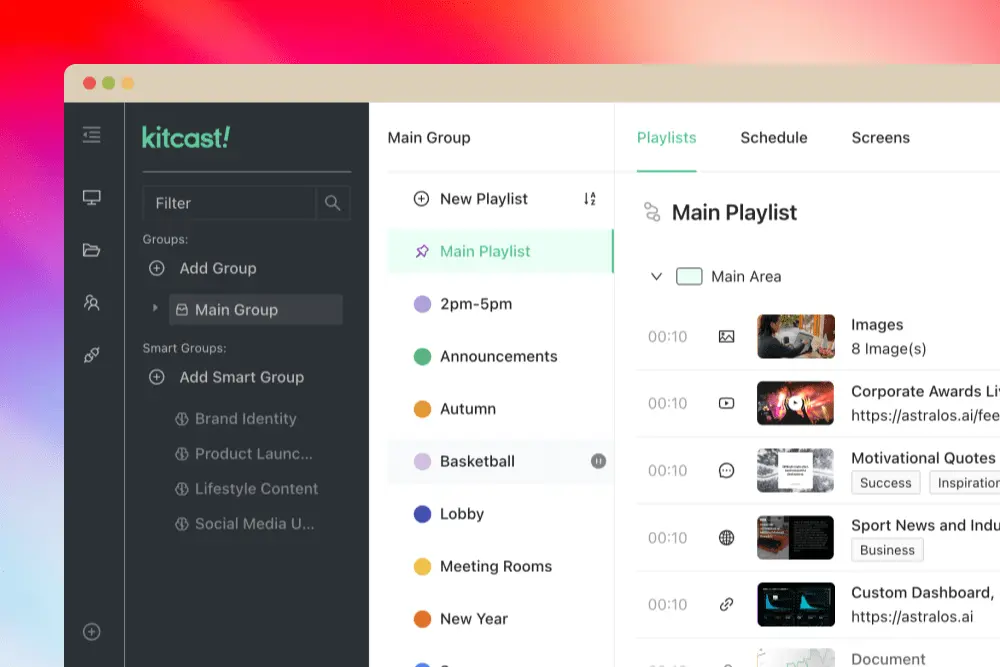
Kitcast was built around one principle: get content on screens fast, without training. The dashboard is intentionally minimal — no legacy UI clutter, no buried settings. Non-technical staff (marketing managers, HR, office admins) can create and publish content in under 5 minutes with zero onboarding.
OptiSigns offers a wider feature set, which comes with trade-offs. The interface is functional and gets the job done, but users on review platforms frequently mention a learning curve with advanced features. Templates can feel less polished than premium competitors, and the layout becomes busier as you scale to more screens and playlists.
Verdict: Kitcast wins on UX polish and speed-to-first-screen. If your team includes non-technical users who need to manage content independently, this gap matters.
Supported Devices & Platforms
OptiSigns supports the widest range of hardware in the digital signage market: Android, Amazon Fire TV, Windows, macOS, Linux, Chrome OS, Raspberry Pi, BrightSign, LG WebOS, Samsung Tizen, Roku, iOS, and ARM Linux. If you have a closet full of random devices, OptiSigns will probably run on them.
Kitcast currently supports Apple TV, Android, Amazon Fire OS, BrightSign, LG WebOS, Samsung Smart TV, Chrome OS, macOS, and iOS — with Windows, Linux, and Raspberry Pi on the roadmap. The strategic difference: Kitcast takes a curated approach. Rather than supporting every device with a generic web layer, Kitcast builds native or deeply optimized apps for each platform. The result is noticeably better performance, smoother animations, and more reliable 24/7 operation.
Verdict: OptiSigns has more platforms today. Kitcast covers all major commercial-grade platforms and delivers a better experience on each one. Choose based on whether you have legacy hardware to support or are buying new.
Content Creation & Templates
Both platforms offer 500+ templates for common use cases: menus, directories, event boards, corporate comms, and more. Where they diverge:
Kitcast offers two content creation paths. The Template Builder lets you customize static graphic designs from the 500+ template library with your own text, images, and branding. Smart Templates go further — these are natively animated, dynamic templates built specifically for tvOS. Widgets (weather, social feeds, news, calendars) run as native components, not rendered images. This means smoother animations, faster loading, and more reliable playback around the clock. Kitcast reports approximately 99.9% crash-free stability.
OptiSigns features a built-in Canvas drag-and-drop editor (similar to a simplified Canva) where you can design layouts from scratch using icons, stock photos, and animated stickers. This gives more freeform design flexibility for users who want to build custom layouts without external tools.
Verdict: If you need a built-in design canvas for creating layouts from scratch, OptiSigns has an edge. If you want templates that look professional out of the box with native animations and proven stability, Kitcast wins.

AI Features
Both platforms have introduced AI-powered content creation.
Kitcast offers prompt-based content generation: describe what you want (e.g., "coffee shop lunch special with warm tones"), and the AI generates a background image and text layout. You can upload your logo on top. It is a practical tool for teams without a dedicated designer. For more small-venue examples like this, see our roundup of digital signage for small businesses.
OptiSigns offers an AI Designer that generates designs within their Canvas editor. Usage may be subject to limits depending on plan.
Verdict: Both are functional. AI in digital signage is still early-stage across the industry. Neither platform has a decisive advantage here.
Scheduling & Playlist Management
Both platforms support playlist creation, content scheduling, recurring schedules, and time-zone-aware publishing.
Kitcast keeps scheduling visual and straightforward — create a playlist, drag content in, set time slots. Multiple playlists can sync across screen groups — essential for teams managing digital signage across multiple locations. The simplicity is intentional: complex scheduling UIs are the #1 reason signage content goes stale (nobody updates it because the tool is too annoying).
OptiSigns offers similar scheduling capabilities with dayparting and recurring schedules. The interface is adequate but can become harder to manage as you scale to dozens of playlists across locations.
Verdict: Functionally similar. Kitcast's UX makes it more likely your team will actually keep content fresh.
Offline Playback & Reliability
This is a significant differentiator.
Kitcast fully caches all content locally on the device. When internet drops, screens keep playing. When connectivity returns, updates sync automatically. This is not theoretical — Kitcast customers run screens on cruise ships crossing the ocean with no internet for days, and at live events where venue WiFi is nonexistent. The workflow is simple: load content → disconnect → deploy the device anywhere.
OptiSigns supports offline playback with content caching, but it is more basic. Users report it works for simple playlists but may not handle complex content scenarios as reliably in fully disconnected environments.
Verdict: Kitcast wins clearly. If offline reliability is a requirement — events, hospitality, remote locations, cruise ships — this is a deciding factor.
Enterprise & Security Features
This is where Kitcast's value proposition becomes stark at the pricing level.
| Feature | Kitcast Plan | OptiSigns Plan |
|---|---|---|
| SSO (SAML) | Pro ($10/mo) | Pro Plus ($15/mo) |
| API access | Pro ($10/mo) | Pro Plus ($15/mo) |
| SCIM user provisioning | Pro ($10/mo) | Enterprise ($45/mo) |
| Audit log | Yes | Enterprise ($45/mo) |
| Proof-of-play reporting | Pro ($10/mo) | Enterprise ($45/mo) |
| Monitoring & offline alerts | Pro ($10/mo) | Varies by plan |
| Role-based access | All plans | Varies by plan |
| MDM (Jamf, Mosyle, Kandji) | Pro ($10/mo) | Varies by plan |
| Zero-touch deployment | Pro ($10/mo) | Varies by plan |
| Emergency/CAP alerts | Yes | Yes |
| GDPR | Yes | Yes |
| Encryption | Yes (transit + rest) | Yes |
| White label | Enterprise | Enterprise |
| Dedicated onboarding | Enterprise | Enterprise |
At the $10/month tier, a Kitcast Pro user gets SSO, API, SCIM, audit logs, proof-of-play reporting, and real-time monitoring with offline alerts. An OptiSigns user at the same price gets none of those — they would need to pay $15/mo (SSO) or $45/mo (API, SCIM, audit log). For a 50-screen deployment, that pricing gap is massive.
Proof-of-play deserves special attention. If you need to verify that specific content actually played on specific screens at specific times — for compliance, ad verification, or internal accountability — this is non-negotiable. Kitcast includes it in Pro. OptiSigns reserves it for Enterprise.
Monitoring & alerts prevent signage from becoming a ticket machine. Kitcast Pro provides screen status visibility, offline alerts, and remote preview — so IT knows immediately when a screen goes dark, rather than discovering it when the CEO walks past a blank display. This is the kind of feature that separates "digital signage software" from "digital signage operations."
This is critical in environments like hospitals, where screen downtime can impact patient experience and safety.
Verdict: Kitcast delivers enterprise-grade security and governance at mid-tier pricing. For IT teams and security-conscious organizations, this alone can justify the switch. These governance features are especially valued in regulated industries like healthcare and healthcare and manufacturing.
Integrations & API
Kitcast integrates with Canva, Google Calendar, Instagram, Facebook, TikTok, X (Twitter), Yelp, TripAdvisor, YouTube, RSS feeds, and more. The API is included in the Pro plan, enabling custom integrations and automation. MDM tools (Jamf, Mosyle, Kandji) are supported for Apple TV fleet management.
OptiSigns advertises 140+ app integrations, including Canva, Google Workspace, Microsoft 365, Slack, social media feeds, weather, traffic, and more. However, OptiSigns counts each variation separately (e.g., YouTube, YouTube Playlists, YouTube Channel, Live Streaming = 4 separate "apps"). In terms of actual unique functionality, the gap is smaller than the numbers suggest. API access requires the Enterprise plan ($45/mo).
Verdict: OptiSigns has a larger raw count of integrations. Kitcast includes API access at a much lower price point, which matters more for custom workflows.
Customer Support
Kitcast treats support as a core product feature, not a cost center. Every customer — whether running 1 screen or 1,000 — gets the same level of hands-on, responsive support. The team actively helps with setup, troubleshooting, and migration. This approach is consistently highlighted in user reviews.
OptiSigns provides email and phone support, with tutorial videos for self-service. Dedicated support and onboarding assistance are reserved for higher-tier plans. Some users report that getting personalized help requires an upgrade.
Verdict: Kitcast. Responsive, human support at every tier is rare in SaaS and becomes critical when you are managing screens at scale during an important event or launch.
Pricing Breakdown (2026)
Both platforms offer monthly and annual billing. Here's how they compare at each tier.
| |||
|---|---|---|---|
| Plan | Monthly | Annual (per month) | Key Features |
| Starter | $9/screen | $7/screen | Upload & play any media (images, videos, audio, PDFs), 500+ templates, Unlimited storage, AI design, scheduling, embeds (YouTube, Calendar, RSS), screen zones, offline caching |
| Pro | $14/screen | $10/screen | Everything in Starter + live streaming, dashboards, webpages, SSO, API, SCIM, (Microsoft & Google), RSS, IPTV, monitoring & alerts, directory/wayfinding, branding, MDM |
| Enterprise | Custom | Custom | Everything in Pro + dedicated team, custom integrations, dedicated onboarding, multi-region support |
| |||
|---|---|---|---|
| Plan | Monthly | Annual (per month) | Key Features |
| *Free | $0 | $0 | *3 screens limit, 25mb file size limit, OptiSigns Logo on screen |
| Standard | $10/screen | $9/screen | Basic features - templates, scheduling, apps, basic analytics |
| Pro Plus | $15/screen | $13.50/screen | SSO (SAML), IoT management, reporting, unlimited users |
| Engage | $30/screen | $27/screen | Interactive kiosks, QR codes |
| Enterprise | $45/screen | $40.50/screen | API, SCIM, mass provisioning, custom onboarding, dedicated support. Minimum 25 screens ($1,125/mo minimum) |
| *Add-on Cost | Video walls ($25/mo each), wireless presentations ($20/mo), background music ($15/mo/user). OptiSigns reserves the right to change prices and add sales tax at any time without notice. | ||
Kitcast special offers: Significant discounts for Education, Non-Profit, First Responders, and Government organizations. Dedicated "Switch & Save" program for teams migrating from other platforms. No credit card required for 14-day trial. Public-sector buyers have their own requirements — accessibility, alerts, procurement; our government digital signage page covers them.
OptiSigns: Non-profit discounts available.
Price Comparison: 50-Screen Deployment (Annual)
For mid-size deployments that need SSO and API access, here's what you'd actually pay per year.
| Feature Set | | |
|---|---|---|
| Base software | $350/mo ($7 × 50) - Starter | $450/mo ($9 × 50) - Standard |
| + SSO | $500/mo ($10 × 50) - Pro | $675/mo ($13.50 × 50) - Pro Plus |
| + API access | Included | $2,025/mo ($40.50 × 50) - Enterprise |
| Annual cost (with SSO + API) | $6,000 for 50 screens annually | $8,100 – $24,300 for 50 screens annually |
For a security-conscious organization that needs SSO and API, Kitcast Pro is 2–4× cheaper than the equivalent OptiSigns plan.
EDU, Non-Profit & Government Discounts
Kitcast has a large education customer base (colleges, K-12 schools, universities) and offers significant discounts — sometimes dramatically lower than list price. First responders and non-profits whose work benefits the community receive substantial discounts as well. Additionally, many schools already have Apple TVs in classrooms for AirPlay. Kitcast lets them double-use those devices: AirPlay during class, digital signage when idle (or locked into single app mode for always-on signage).
OptiSigns offers non-profit discounts, though specific terms are not publicly listed.
Verdict: If you are in education or non-profit, contact Kitcast directly. The savings can be significant.