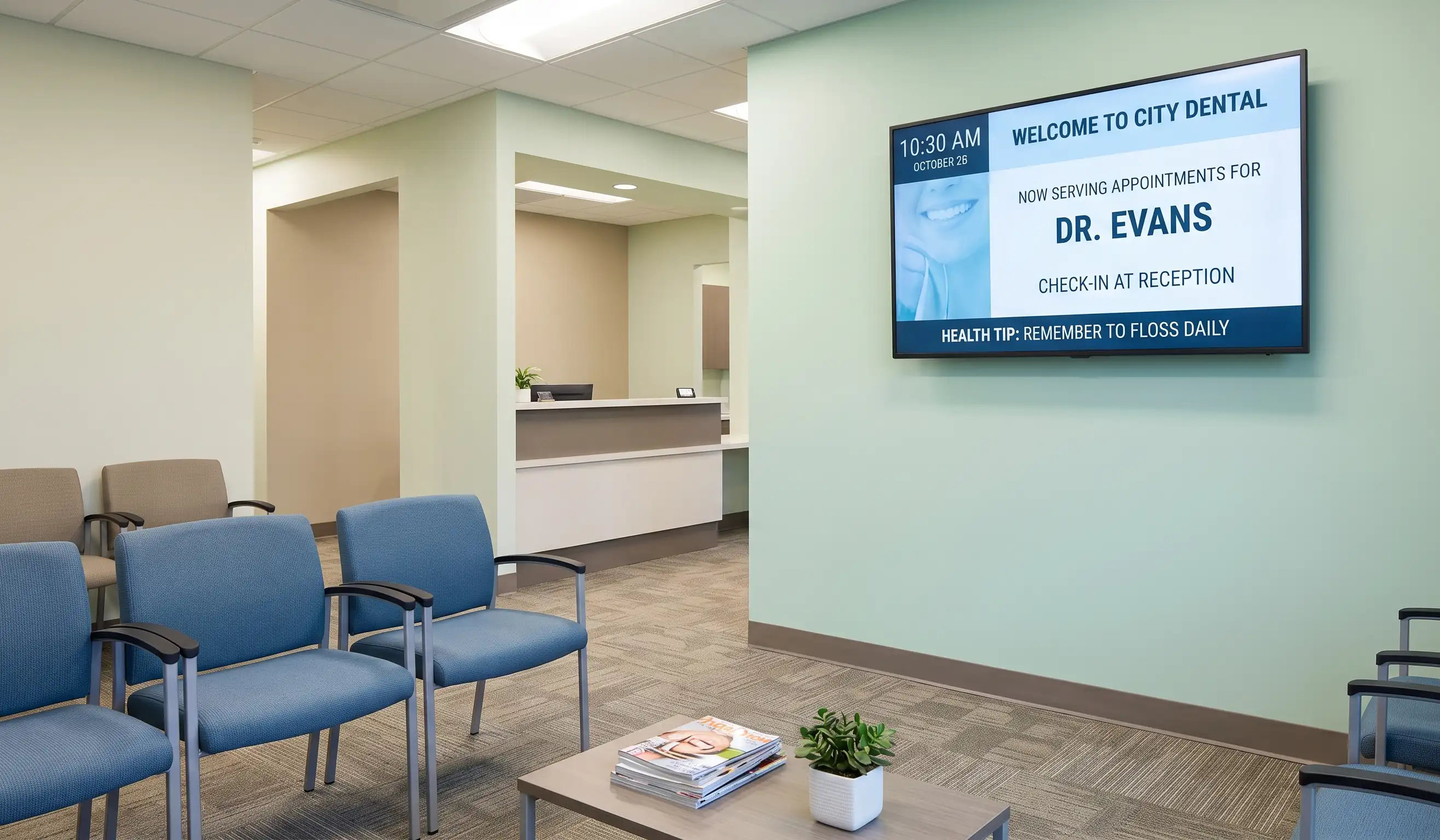
Doctor's offices, dental clinics, auto service bays, HR lobbies, and DMV branches all share one design problem: a room full of people with five to forty minutes of nothing to do. A muted cable channel is the default fix, and it is a bad one. It shows ads for competitors, news that may upset patients, and content the front desk cannot control. Waiting room digital signage solves this with a screen, a small media player, and cloud software the receptionist updates from a browser. The setup costs about $200 in hardware and $7 per screen per month after that. This guide covers what the screens display, which hardware to buy, how much it costs, and how to install one in under an hour.
What does waiting room digital signage actually do?

Three jobs, in order of impact on the visitor experience.
The first is showing real-time information the front desk used to repeat all day. Wait times, current queue position, today's schedule, "now serving" call-outs, parking validation rules, Wi-Fi credentials, and check-in QR codes. Patient experience research consistently shows that perceived wait time matters more than actual wait time, and posting visible wait status measurably reduces perceived wait. The receptionist stops answering the same question every two minutes.
The second is replacing the muted cable TV with branded entertainment and education. Health tips for clinics, vehicle maintenance reminders for service centers, financial planning content for banks, employee spotlights for corporate lobbies. Content is muted by default and runs on a loop, so it does not compete with conversations.
The third is driving revenue with promotions. Dental offices promote whitening packages, vet clinics promote dental cleanings, auto shops promote tire packages, gyms promote personal training. Industry research from Intel and POPAI has shown captive-audience digital signage can lift sales of featured items by up to 30%. We cover the gym version of this playbook — class boards, PT promos, retail shelves — on our gym digital signage page. Dental practices have their own version of this playbook — see our guide to dental office digital signage.
Modern waiting room signage software handles all three jobs from one dashboard. Kitcast splits a 1080p or 4K screen into zones, so wait times, brand video, and promotional content all run at the same time. Zones update independently, so the wait time refreshes every 60 seconds while the promo video plays uninterrupted for two minutes. Emergency alerts can take over every screen across a multi-location practice in seconds.
The fourth, less obvious job is internal. Many healthcare and corporate teams use the same software stack to publish staff-only information in back offices, breakrooms, and check-in stations. One subscription, one dashboard, all screens. For the lobby-specific side — welcome screens, visitor check-in, and brand display — see our lobby digital signage guide.
What are waiting room information screens?
Waiting room information screens are TV displays that show queue status, appointment updates, directions, and announcements instead of muted cable TV. The screen itself is ordinary hardware — what turns it into an information screen is the software behind it. Any consumer TV becomes a waiting room TV display once it is paired with a media player like an Apple TV or Fire TV Stick running digital signage software, so a practice can move from cable to controlled, branded programming without buying special equipment.
The difference matters for visitors: an information screen answers the questions people actually have while they wait — how long, where to go, what to expect — while a muted TV just fills the silence.
What hardware works for waiting room screens in 2026?
Four mainstream options for waiting room deployments, with the trade-offs that actually matter in a clinic or service desk environment.
Apple TV 4K (3rd gen). The default Kitcast recommendation since the app launched on tvOS in October 2015. $199 at retail (64GB, pricing checked July 2026), fanless, runs cool, supports zero-touch deployment through Jamf, Mosyle, and Kandji, locks into single-app mode for kiosk use. Best fit for healthcare, dental, and corporate offices that already use Mac and iPad in the back office.
Fire TV Stick 4K Max. $59 at retail, plug-and-play, USB-powered from the back of the TV. Best for budget-conscious small practices running one to five screens. Lacks enterprise MDM, so IT teams managing fleets prefer Apple TV or BrightSign.
BrightSign HD224 or Series 5. $300 to $500. Commercial-grade purpose-built signage player, rated for 24/7 operation, three-year warranty, no consumer OS surface area for security audits. Best for hospitals, government waiting areas, and any environment with strict IT compliance requirements.
Smart TV built-in (Samsung Tizen, LG webOS). Kitcast runs natively on Tizen 4.0 and webOS 4.0 and newer. Zero extra hardware, single power cable, ideal for new installs where the TV is being purchased anyway. The trade-off is slower hardware refresh cycles compared with a swappable media player.
For most waiting rooms with one to four screens, Apple TV 4K or Fire TV Stick 4K Max is the right call. Choose BrightSign when the hospital IT team requires a commercial-grade player on the network audit. Choose built-in Tizen or webOS when buying new screens anyway. A full comparison with specs, MDM support, and three-year total cost of ownership is in the digital signage hardware breakdown.
What content should you display in a waiting room?
Five content types that actually earn the screen.
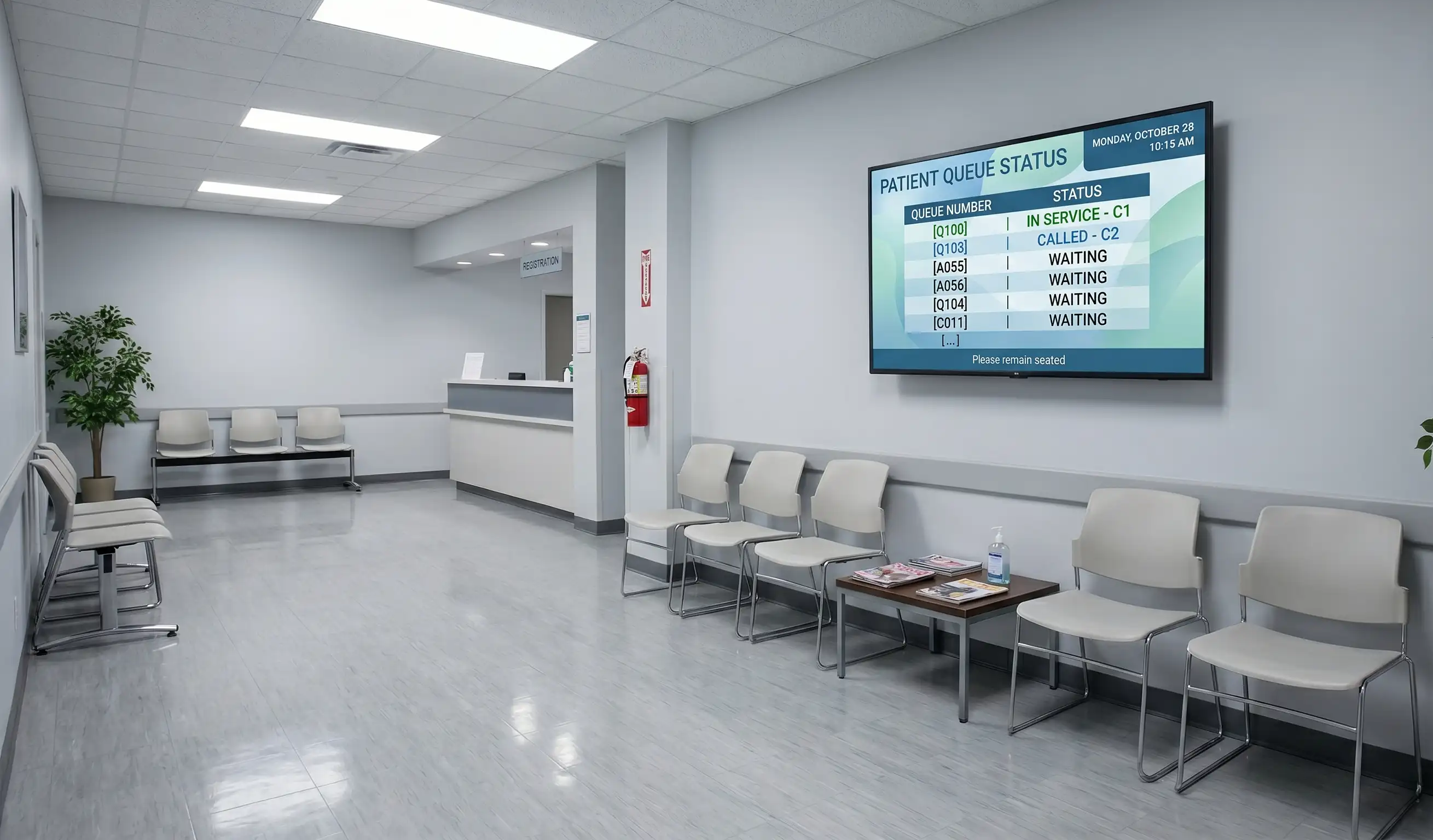
Live queue and wait status. Pull from the scheduling system through API or a shared spreadsheet. "Now serving #34. Estimated wait: 12 minutes." This single zone takes the most repetitive question off the front desk.
Educational health or service content. Sixty to ninety second loops on topics tied to your specialty. A dental office shows brushing technique, fluoride benefits, and whitening before-and-after content. An auto service bay shows tire rotation schedules, brake-pad wear signs, and seasonal maintenance reminders. Educational content lowers the perceived wait and warms up patients for upsell conversations.
Promotions and seasonal offers. A dermatology clinic running a January Botox special. A vet clinic promoting heartworm prevention before mosquito season. Update prices and dates from the dashboard, not by reordering reprinted posters.
Practice-branded content. Provider bios, before-and-after galleries, team photos, awards, certifications, insurance accepted, patient testimonials. This is the content the muted cable TV cannot show, and the content that turns a visit into a referral.
Live data and widgets. Local weather, time, news headlines from a controlled source, social media wall pulling from the practice's own Instagram. Kitcast ships with widgets for weather, time, calendar, RSS, and social feeds, plus a social media wall display for practices with an active social presence.
What not to show: anything political, any cable news with chyrons covering breaking events, autoplay video with sound, anything that updates faster than every 30 seconds. A good rule: a piece of content should be readable from 12 feet away, in under six seconds, with the sound off.
Kitcast ships with over 500 pre-built templates organized by industry, including dozens designed specifically for healthcare, dental, and lobby use. The drag-and-drop editor lets a receptionist update a promo in three minutes without designer help.
10 waiting room digital signage ideas you can copy
If you need a starting point for your waiting room screens, these are the formats that come up again and again across clinics, dental offices, and service businesses.
1. Appointment and queue updates. The "now serving" board covered above — the single highest-value zone on the screen.
2. Wayfinding directions. Turn the screen nearest the entrance into a directory: department names, floor numbers, room ranges. In a multi-wing clinic this saves the front desk from repeating the same directions all day.
3. Emergency and service alerts. Schedule changes, delayed appointments, closures. A screen updates in seconds — faster than a printed notice taped to the door, and visible to everyone at once.
4. Content for kids. Cartoons, simple riddles, or animated loops in pediatric and family waiting areas. A distracted child is a calmer waiting room, for staff and parents alike.
5. Health tips and educational loops. Short 60–90 second segments tied to your specialty, as described in the content section above.
6. Meet-the-team slides. Provider bios, certifications, and photos — the content that builds trust before the visit starts.
7. Seasonal promotions. Time-limited offers updated from the dashboard, not the print shop.
8. Weather, news, and time widgets. Neutral, always-relevant filler that needs no maintenance once set up.
9. A social media wall. A live feed from the practice's own Instagram or Facebook, moderated before anything reaches the screen.
10. Go-paperless boards. Everything currently living in printouts — accepted insurance, office policies, pricing — moved to a rotating slide. Less printing, nothing out of date on the wall.
How much does waiting room digital signage cost?
The full first-year cost for a one-screen waiting room runs between $200 and $700, then $84 to $120 per year for software after that.
Hardware (one-time). Apple TV 4K $199, Fire TV Stick 4K Max $59, BrightSign HD224 around $300. The TV itself, if not already on the wall, runs $300 to $800 for a 50 to 55 inch commercial-grade Samsung or LG. Mount, HDMI cable, and Ethernet adapter add about $50.
Software (recurring). Kitcast Starter is $7 per screen per month, billed annually, which works out to $84 per year. Pro is $10 per screen per month and adds SSO, SCIM provisioning, MDM integration through Jamf, Mosyle, and Kandji, REST API access, and audit log. Most single-clinic waiting rooms run Starter. Multi-location dental groups, hospital networks, and enterprise IT-managed deployments run Pro.
Content (one-time or recurring). Free if you use the 500+ Kitcast template library. $200 to $800 one-time if you hire a designer for custom branded slides. Around $50 to $200 per month if you license medical or industry-specific content from a third-party library.
Total year-one for one screen, Apple TV, Starter plan, template-only content: about $213. Year two onward: $84. For a ten-location dental group running two screens per location on Pro: about $4,090 year one ($1,290 hardware, $2,400 software, $400 setup), then $2,400 per year.
This is a fraction of what a single missed appointment costs a clinic. The math typically pays back inside three months on perceived-wait reduction alone, before any promotional revenue lift. A full cost breakdown across hardware, software, and content categories is in the digital signage cost breakdown for 2026.
How do you set up waiting room signage in under an hour?
Five steps. Tested across 10,000+ Kitcast deployments.
Step 1: Install the TV and player (15 minutes). Mount the screen at eye level, around 60 inches from the floor to the center of the screen. Plug the Apple TV, Fire TV, or BrightSign into HDMI behind the TV. Connect Ethernet if available, Wi-Fi if not.
Step 2: Install Kitcast on the player (5 minutes). Open the App Store on Apple TV (or the Amazon Appstore on Fire TV), search Kitcast, install. The app opens and shows a six-character pairing code on the screen.
Step 3: Pair the screen to your dashboard (2 minutes). Sign up for a free 14-day Kitcast trial, enter the pairing code in the dashboard, name the screen ("Front Lobby" or "Exam Room Hallway").
Step 4: Pick a template and add content (15 to 20 minutes). Open the template library, filter by healthcare, dental, hospitality, or whichever industry fits. Drag the chosen template into a playlist, replace placeholder text with practice info, swap the logo, set the playback duration per slide (default 10 seconds is fine). The hospitality templates connect to a bigger playbook — lobby boards, concierge screens, event listings — on our hotel digital signage page.
Step 5: Publish and verify (5 minutes). Click publish. The Apple TV or Fire TV pulls the content within 30 seconds and starts playing on the screen. Walk into the waiting room, confirm it plays end-to-end, confirm the text is readable from across the room.
Total elapsed time for a single-screen install: 45 to 50 minutes. Multi-screen installs at the same location add about 10 minutes per additional screen because the dashboard lets you assign the same playlist to multiple screens with one click.
For multi-location healthcare groups, IT teams use zero-touch deployment through Jamf or Mosyle to push Kitcast to dozens of Apple TVs in one configuration profile. Detailed install guides for healthcare digital signage cover HIPAA-aware content guidelines and emergency alert configuration.
Frequently Asked Questions
What is waiting room digital signage?
Waiting room digital signage is a screen, a media player such as Apple TV or Fire TV, and cloud-based software that lets staff update displayed content from a web browser. It shows wait times, health or service tips, promotions, and branded content in healthcare, dental, automotive, banking, and corporate waiting areas.
How much does waiting room digital signage cost in 2026?
A single-screen setup costs $60 to $400 for hardware plus $7 to $10 per screen per month for software. Kitcast Starter is $7 per screen monthly, billed annually. First-year total for one screen with Apple TV and template-only content is around $213.
What is the best TV size for a waiting room?
A 50 to 55 inch screen works for most waiting rooms with seating 8 to 15 feet from the wall. Larger rooms with seating 15 to 25 feet away should use 65 to 75 inch screens. Mount the center of the screen at about 60 inches from the floor.
Can you show real-time wait times on waiting room signage?
Yes. Kitcast pulls wait time data from scheduling systems through API, from a Google Sheet, or from manual updates by the front desk. The display refreshes every 60 seconds and can show queue position, estimated wait, and "now serving" call-outs in a dedicated screen zone.
Is waiting room digital signage HIPAA compliant?
The software itself does not handle protected health information; compliance depends on the content displayed. Do not show patient names, dates of birth, or any protected health information on a public screen. Use anonymized queue numbers instead. Kitcast supports SSO, SCIM, and audit log on the Pro plan for compliance-driven IT teams.
What content engages patients in a waiting room?
Short loops of educational content (60 to 90 seconds), provider bios, treatment before-and-afters, seasonal promotions, local weather, and live social media walls perform best. Avoid political news, autoplay audio, and anything that updates faster than every 30 seconds.
Does waiting room signage work offline?
Yes, on the right software. Kitcast caches all content locally on the Apple TV, Fire TV, or BrightSign player. When the office Wi-Fi drops, the screens keep playing the most recent published content and sync new content automatically when the network returns.
What is the difference between waiting room signage and a cable TV subscription?
Cable or streaming TV shows content you do not control, runs ads for competitors, and cannot display practice-specific information like wait times or promotions. Waiting room signage is fully controlled by the practice, supports multiple content zones on one screen, and updates in seconds from a browser.
How do you connect a waiting room screen to digital signage software?
Install the Apple TV, Fire TV, or BrightSign behind the TV, download the Kitcast app from the device's app store, open the app, copy the pairing code shown on the screen, paste it into the Kitcast dashboard. The screen connects in under five minutes.
Can one waiting room signage account manage screens at multiple locations?
Yes. One Kitcast account can manage one to thousands of screens across any number of locations. Use tags and folders to organize screens by clinic, region, or screen type. Multi-location dental groups, urgent care chains, and hospital systems run all their lobbies from one dashboard.
What's the fastest way to upgrade your waiting room?
A waiting room screen is the first thing patients, customers, or visitors look at when they sit down. A muted cable channel sends them ads for competitors. Branded waiting room digital signage sends them wait times, education, and reasons to come back. The hardware is $199. The software is $7 per screen per month. The install takes under an hour. Start a free 14-day Kitcast trial on an Apple TV, Fire TV, or any compatible smart TV — no credit card required. See Kitcast pricing for the full plan comparison.
Internal Communications Digital Signage: Strategy, Content Ideas & Examples (2026)
6 Best Digital Signage Software for Education in 2026 (Compared)