
Create Custom Displays with Smart Template App
Create unique displays in minutes with Kitcast’s Smart Templates for digital signage. Build custom designs that fully reflect your message, all while using your ideal colors, media, and text - fast and easy. Design Screens on Your Own Terms with Smart Templates!
Sign up in under a minute.
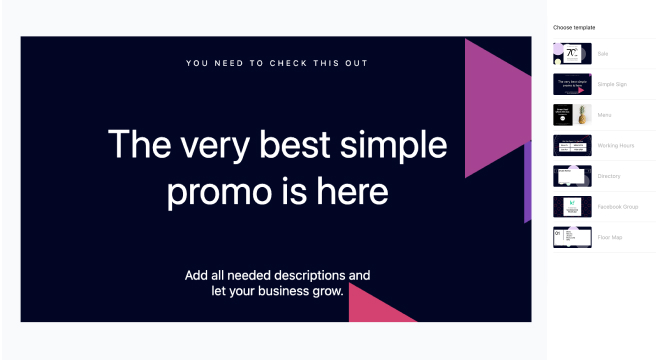
How to Use the Smart Template App on Digital Signage
Log in to Kitcast’s dashboard, and select “Smart Template” in the app menu.
Choose the template that fits your communication purpose.
Add text, pick background colors, animation, and layout, or download media.
Configure the time-on-screen setting and get the app running on your digital displays by adding it to the necessary playlist.
Step-by-Step Guide on How to Use Smart Templates on Kitcast Digital Signage Screens.

Smart Templates Features for Smart Digital Signage

Professional Pre-Built Designs
Choose from pre-designed high-quality templates for any purpose.

Drag, Drop, Done
Effortless template customization with an intuitive editor.

Engaging Animations
Make your content pop with built-in motion effects that grab attention.

Dynamic Content Updates
Keep display content fresh with real-time updates. Change text, images, or offers in seconds.

Multi-Location Ready
Need to push the same design across multiple screens? It can be done in a couple of clicks.

Designed to Convert
Every template is built with engagement in mind: your content doesn’t just look good - it works.
Smart Templates: The Solution for Every Use Case
.webp)

Explore Other Widgets


Frequently Asked Questions
It’s a tool that lets you create custom digital signage content quickly using pre-built templates. You can tweak designs, colors, and text to match a specific style.
Not at all! Kitcast’s Smart Template widget is for anyone, regardless of design experience. It’s easy to drag, drop, and customize to fit your needs.
Yes! You can fully adjust the color palette and text or upload your own media to ensure your designs align with your company’s identity.
It’s quick - often just a few minutes! Choose a template, make your adjustments, and your content is ready to go live.