
AI Content App for Digital Signage
Generate high-quality images and videos for your digital signage in a few minutes. Complement your visuals with texts created by AI and deliver impactful messages to your screens. Transform Ideas into Content with AI-Driven App.
Sign up in under a minute.
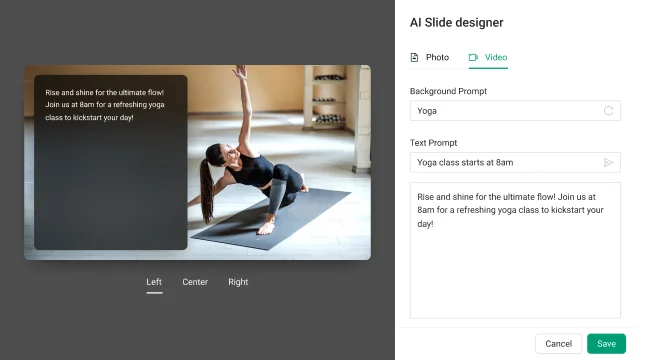
How to Use the AI Content App on Kitcast Digital Signage
Open the Kitcast dashboard, go to the apps section, and click “AI Content”.
Use prompts to create visuals and text for them. Choose the text placement area.
After creating the app, specify the period for it to run on digital signage.
Manage the app display by adding it to the required playlists and screens.

Key Features of the AI Content App by Kitcast

Smart Content Creation
Simply tell Kitcast's AI widget what you want, and it instantly generates and displays it.

Automated Content Scheduling
Set your content to automatically appear at the right time without needing manual intervention.

Simple Modification
Make quick updates to the AI Content widget, modifying it with a few clicks.

Multi-Screen Synchronization
Kitcast supports synchronizing widget content across multiple screens in real time.

Flexible Management
Duplicate the widget, add it to different groups of screens/playlists, or pause it when necessary.

Cost Efficiency
By automating content creation, Kitcast’s AI widget reduces the need for manual labor.
Cutting-Edge Solution That Powers Every Space
.webp)
.webp)
.webp)
Explore Other Widgets


Frequently Asked Questions
The AI Content widget is a feature that generates digital signage content with prompts. It leverages artificial intelligence to create visuals and texts without spending tons of time on this.
The AI Content widget generates visuals and short texts by interpreting the prompts you provide. It’s designed to create dynamic content like promotional graphics, announcements, or simple visuals, which you can display across your digital signage networks.
It can generate photos, videos, and creative texts.
Yes, it’s designed for simplicity. You can start generating content within minutes by entering prompts.