Table of Contents
Creating great content is only half the battle. You could have the most stunning 4K visuals, the wittiest copy, and the most engaging videos in the world. But if that content plays to an empty room – or worse, if it plays to the wrong people at the wrong time – it’s wasted effort.
This is where effective content scheduling strategies come into play.
Whether you are managing a network of digital signage screens in a corporate office, a retail store, or a university campus, the “when” is just as important as the “what.”
Today, we are going to walk through the essential steps to building a content schedule that works. And, we’ll show you how tools like Kitcast can turn a complex scheduling headache into a breeze.
What is Content Scheduling?

Before we dive into the steps, let’s define what we are talking about for clarity.
Content scheduling is the process of planning, organizing, and automating the delivery of your media assets across your digital channels (specifically digital signage) to ensure the right message reaches the right audience at the optimal time.
It isn’t just about filling a slot on a calendar. It is about strategic timing. It’s about knowing that your morning crowd needs coffee and news, while your evening crowd needs relaxation and promotion. This aligns perfectly with building a broader digital signage communications strategy that scales with your business.
Step 1: Audit Your Current Content Assets
You cannot schedule what you don’t know you have. The first step to any effective strategy is a content audit.
Open up your digital asset management folder or your current signage dashboard. What do you see?
- Are there outdated promotions from last Christmas?
- Are there low-resolution images that look grainy on big screens?
- Do you have a mix of video, static images, and live widgets (like weather or news)?
Categorize Your Content
Group your assets into three buckets:
- Evergreen Content: This is content that is always relevant. Brand values, wayfinding maps, and generic “Welcome” messages fall here.
- Time-Sensitive Content: Promotions, holiday greetings, or event countdowns. These have an expiration date.
- Dynamic Content: Real-time data like weather feeds, news tickers, or social media walls.
Step 2: Define Your Audience by “Dayparting”
In the digital signage world, “Dayparting” is a crucial concept. It simply means dividing the day into distinct parts and scheduling different content for each block. This is particularly effective for industries like hospitality and food service.
To do this effectively, you need to know who is looking at your screens and when.
- The Morning Rush (8:00 AM – 10:00 AM):
- Audience: Commuters, employees arriving at work, coffee drinkers.
- Strategy: Keep it quick and informative. Show traffic updates, weather forecasts, the daily meeting agenda, or quick motivational quotes.
- The Mid-Day Lull (11:00 AM – 2:00 PM):
- Audience: Lunch crowds, shoppers, people taking breaks.
- Strategy: This is prime time for entertainment or longer-form content. If you run a restaurant, this is the time to switch your digital menu boards to lunch specials. You can learn more about how to set this up in our guide to digital menu boards.
- The Evening Wind-Down (4:00 PM – 7:00 PM):
- Audience: People leaving work, evening shoppers.
- Strategy: Focus on call-to-actions (CTAs). “Don’t forget to sign up,” “See you tomorrow,” or “Check out our website.”
By mapping your audience’s behavior to specific times, you ensure your content scheduling is relevant.
Pro Tip: If you find your library is lacking, don’t worry. You can find inspiration on how to build visuals from scratch in our guide on creating effective content for digital signage.
Step 3: Establish a Content Ratio
One of the biggest mistakes in content scheduling is being too promotional. If your screens scream “BUY THIS” 24/7, people will tune them out. This is known as “banner blindness.”
To keep viewers engaged, use the 60/30/10 Rule:
- 60% Value-Add Content: News, weather, interesting facts, art, or helpful tips. This earns the viewer’s attention.
- 30% Brand/Culture Content: Employee spotlights, company milestones, or customer testimonials. This builds trust.
- 10% Promotional Content: Sales, offers, and direct CTAs. This drives revenue.
When you set up your playlist in Kitcast, you can easily shuffle your content to maintain this ratio without having to manually count slides. For retail environments, balancing this ratio is key to enhancing the in-store shopping experience.
Step 4: Create a Centralized Content Calendar
Now that you have your assets and your strategy, you need a calendar.
While you can use a spreadsheet, it is prone to human error. A better approach is to map out your themes for the month.
- Week 1: Focus on Product Launches.
- Week 2: Focus on Employee Advocacy.
- Week 3: Focus on Customer Success Stories.
- Week 4: Focus on Upcoming Events.
Having a thematic overview ensures your messaging doesn’t feel disjointed. It also helps your design team know what they need to produce in advance, preventing the last-minute scramble for assets.
Step 5: Leverage Automation Tools (The Kitcast Advantage)
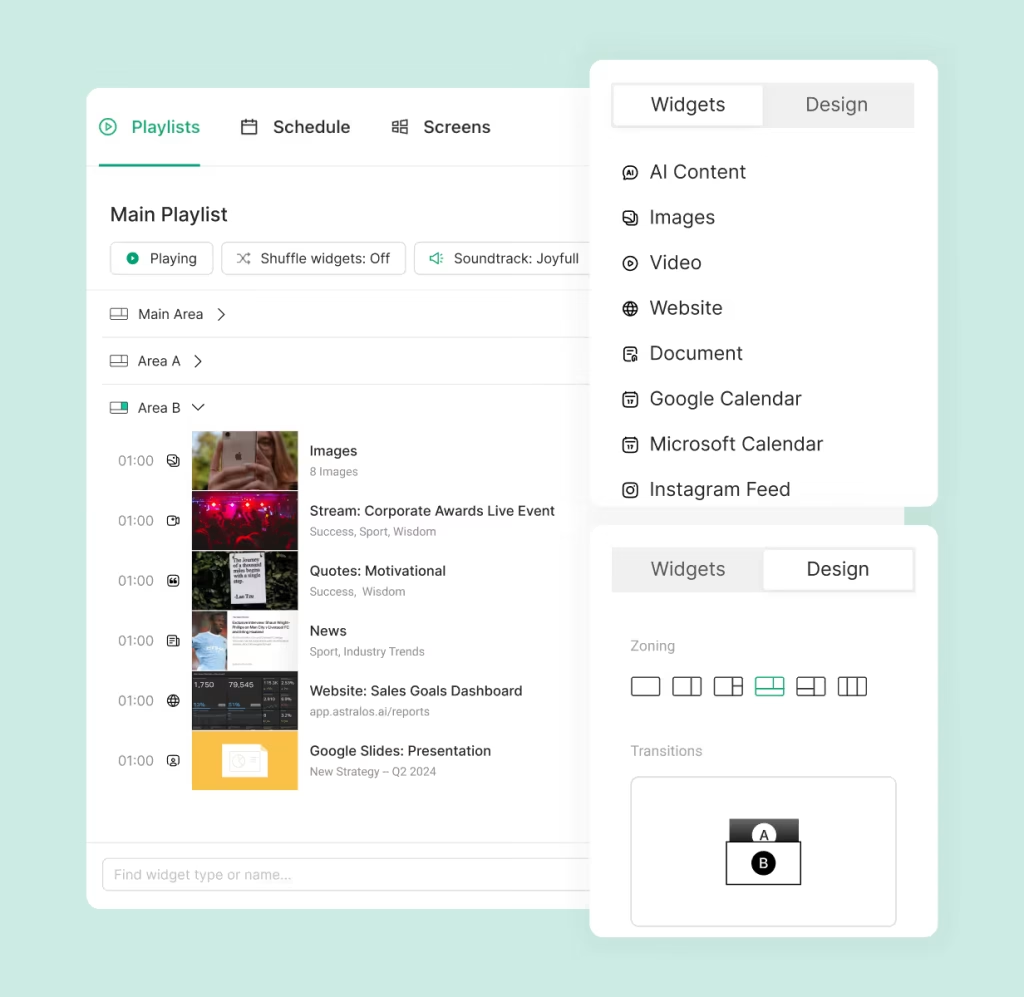
This is the most critical step. You cannot maintain an effective schedule if you are relying on USB sticks or manual uploads. You need a cloud-based digital signage solution that prioritizes automation.
Kitcast is the best digital signage solution for automation
Kitcast is designed to take the heavy lifting out of scheduling. Here is how it specifically helps with the strategies we’ve discussed:
Smart Playlists
Instead of dragging and dropping individual files every day, Kitcast allows you to create Smart Playlists. You can set rules so that specific folders of content play only on weekends, or only when the weather is rainy.
Set It and Forget It
With Kitcast’s intuitive dashboard, you can schedule content months in advance.
- Do you have a Halloween promo? Upload it in August, set the start date for October 1st and the end date for November 1st.
- Kitcast will automatically start playing it when the time comes and—more importantly—stop playing it when the event is over. No more “Happy New Year” signs lingering in February.
Centralized Control for Enterprise
If you have screens in New York, London, and Tokyo, you don’t need to email files to three different office managers. You can schedule content for all locations from your laptop. This is essential for large organizations using Kitcast Enterprise solutions, where global consistency is key.
You can even set time-zone-specific schedules so your “Good Morning” message actually appears in the morning, regardless of the location.
Step 6: Integrate Dynamic Data and AI
Static images get boring. To make your schedule feel “alive,” you must integrate dynamic sources.
Dynamic content is excellent for scheduling because it updates itself. You schedule the widget once, and the content changes every minute.
Examples of dynamic integrations to schedule:
- Social Walls: Connect your Instagram or Twitter feed. As users post with your hashtag, the content on the screen refreshes.
- News RSS Feeds: Display the latest headlines from CNN, BBC, or TechCrunch.
- AI-Generated Content: If you are running low on fresh visuals, you can use AI digital signage tools integrated within Kitcast to generate professional designs on the fly.
By scheduling a dynamic widget to appear for 10 seconds every 2 minutes, you ensure there is always something new on the screen, even if you haven’t designed new graphics in weeks.
Step 7: Monitor, Analyze, and Iterate
The final step to effective content scheduling strategies is realizing that the job is never truly “done.” You need to analyze performance.
How do you measure success in digital signage?
- Engagement: Are people stopping to look?
- Action: Did that QR code you scheduled for 2:00 PM get any scans?
- Feedback: Are employees mentioning the announcements?
If you notice that your 9:00 AM announcements are being ignored, maybe your scheduling strategy is off. Perhaps 9:00 AM is too busy, and 10:30 AM would work better.
Use the analytics provided by your software to see proof of play. Ensure your screens were actually online and the content was delivered as scheduled.
Why Kitcast is the Best Solution for Scheduling

There are many tools out there, but when it comes to effective content scheduling strategies, Kitcast stands out for a few reasons that matter to business owners and IT managers alike.
1. Enterprise-Grade Scheduling, Consumer-Grade Ease
You don’t need a degree in IT to use Kitcast. The scheduling interface is a visual timeline, similar to a calendar app you use on your phone. If you can use Google Calendar, you can schedule a global network of screens on Kitcast.
2. Reliability
Nothing ruins a content schedule like a black screen. Kitcast caches content locally on the device. It is among the most reliable solutions on the market.
3. Seamless Ecosystem Integration
Your content likely lives in Dropbox, Google Drive, or Canva. Kitcast integrates directly with these tools. You can update a flyer in Canva, and because you’ve scheduled the integration, the screen updates automatically. This reduces the number of steps in your workflow from ten down to one.
Common Pitfalls to Avoid
As you implement these steps, keep an eye out for these common scheduling traps:
- Over-Scheduling: Don’t cram too much into a loop. A playlist that is 20 minutes long is too long. Aim for a loop of 2-5 minutes so people have a chance to see the message more than once.
- Ignoring Dwell Time: If your screen is in a hallway where people walk past in 3 seconds, don’t schedule a 30-second video. Schedule a 3-second image. Conversely, if you are designing hotel lobby digital signage, you have an audience that can consume longer content.
- The “Set and Forget” Trap: While automation is great, don’t forget to check in. Seasons change, and so do business goals. Review your schedule at least once a month.
Summary: Your Checklist for Success
To dominate the search results (and your internal communications), here is the recap of the steps to effective content scheduling strategies:
- Audit: Clean up your library.
- Daypart: Target specific times of the day.
- Ratio: Use the 60/30/10 rule.
- Calendar: Plan themes in advance.
- Automate: Use Kitcast to manage playlists and expiration dates.
- Dynamic: Mix in live data feeds.
- Analyze: Check the results and adjust.
Final Thoughts
Effective content scheduling is not about filling space; it is about respecting your audience’s time. It is about delivering value at the exact moment it is needed.
By moving away from manual updates and embracing a strategic, automated approach with Kitcast, you free up your team to focus on what really matters: creating creative, impactful messages that drive your business forward.
Ready to transform your screens? Start your journey toward smarter, easier digital signage today.
Internal Communications Digital Signage: Strategy, Content Ideas & Examples (2026)
6 Best Digital Signage Software for Education in 2026 (Compared)