
Table of Contents
As a small business owner, you are constantly looking for cost-effective ways to interact with your customers. This is where digital signage comes in. While you have likely seen those bright screens in big retail stores, you might think they are too expensive or complicated for your shop. That is a common misconception.
Digital signage is actually one of the most affordable and effective tools for small businesses today. It turns a TV screen into a powerful marketing machine that drives sales. In this guide, we will walk you through everything you need to know. We will cover the hardware, the software, and why Kitcast is the best partner to help you grow your business.
What is Digital Signage?
Let’s keep it simple. Digital signage is a sub-segment of electronic signage. It uses technologies like LCD, LED, and Projection to display content. For a small business, it is a system that allows you to show images, videos, web pages, and text on a screen.
It is the modern version of the chalkboard or the printed poster. The difference is that you can change the message in seconds from anywhere in the world.
The Three Main Components
To get started, you need three things:
- The Screen: This can be a professional commercial display or a standard consumer TV you buy at an electronics store.
- The Media Player: This is the computer that tells the screen what to play. It connects to the internet and stores your content.
- The Software: This is the “brain” of the operation. It is the dashboard you use to design and schedule your content.
Why Small Businesses Need Digital Signage

You might be asking if this is really necessary. Can’t you just stick with printed flyers? You can, but you are missing out on revenue.
Digital signage captures 400% more views than static displays. Human eyes are naturally drawn to moving images and bright lights.
Here are the top benefits for small business owners:
- Boosted Revenue: Digital screens can influence purchase decisions right at the point of sale. You can upsell items or promote high-margin products.
- Reduced Costs: Think about how much you spend printing new menus or posters every time the season changes. Digital signage eliminates printing costs entirely.
- Instant Updates: Did you run out of the daily special? With digital signage software, you can remove it from the screen in seconds.
- Better Customer Experience: Screens can entertain customers while they wait. This lowers the perceived wait time and keeps them happy.
For a deeper dive into the benefits of switching to digital, check out our article on The Benefits of Digital Signage for Retail.
Step 1: Choosing the Right Hardware
Hardware is often the part that scares business owners. You do not want to buy a bunch of expensive equipment that is hard to set up.
The good news is that you probably already have part of the solution.
The Screen
For most small businesses, a standard High Definition (HD) or 4K TV works perfectly. If your shop is brightly lit, you might want a brighter screen. If the screen will be on 24/7, you might look into a commercial-grade display. However, for a standard 9-to-5 shop, a regular TV is a great starting point.
The Media Player (The Kitcast Advantage)
This is where many businesses get stuck. They buy expensive, proprietary media players that are hard to use.
We recommend using the Apple TV or an Amazon Fire TV Stick.
Why? They are reliable, affordable, and you probably already know how to use them.
Kitcast is designed to work seamlessly with these devices.
You simply plug the Apple TV or Amazon Fire TV Stick into your screen, download the Kitcast app, and you are done. No IT team required.
Step 2: Selecting the Best Software
The software is the tool you will use every day. If the software is clunky or confusing, you will stop using your screens.
For small businesses, the software needs to be three things:
- Cloud-based: You should be able to update your screens from your laptop at home or your phone.
- Intuitive: It should be as easy to use as social media.
- Scalable: It should grow with you as you open more locations.
Why Kitcast is the Best Solution for Small Businesses

There are many software options out there. However, Kitcast stands out as the best solution for small businesses for a few key reasons.
Simplicity and Ease of Use We designed Kitcast for business owners, not IT technicians. You do not need a manual to figure it out. Our dashboard is intuitive and clean. You can connect a screen and publish your first slide in less than 5 minutes. If you can send an email, you can manage a Kitcast screen.
Enterprise Power for Everyone Don’t let the simplicity fool you. Under the hood, Kitcast is a powerhouse. We provide the same stability, security, and speed that large global enterprises use. This means your screens stay online, your content loads fast, and your data remains secure. You get big-business technology at a small-business price.
Flexible Hardware Support We do not force you to buy expensive, proprietary media players. Kitcast works seamlessly on the devices you likely already know and trust.
- Apple TV: We are an “Apple First” solution. This is the gold standard for stability and 4K rendering.
- Amazon Fire TV Stick: This is a fantastic, budget-friendly option. It is perfect for getting started quickly without a large investment.
- Android TV: If you have smart screens with Android built-in, you can run Kitcast directly on the TV without any external cables.
Top Features for Growth We give you the tools to create professional content without hiring a designer.
Social Feed Integration: Connect your Instagram, Facebook, or Twitter to show live updates and customer testimonials on the big screen.
Smart Scheduling: Automate your content. Show breakfast menus in the morning and happy hour specials in the evening automatically.
Template Library: Stuck on design? Use our free, professional templates to make your content look great instantly.
Step 3: Creating Content that Sells
You have the TV. You have the Kitcast app installed. Now, what do you show?
Content is king. The most common mistake small businesses make is leaving the same image up for weeks. Your content needs to be fresh and relevant.
Ideas for Your Screens
- Digital Menu Boards: If you run a cafe or restaurant, this is essential. Make your food look irresistible with high-quality photos. You can schedule menus to change automatically from breakfast to lunch. Read more about setting this up in our guide on How to Create Digital Menu Boards.
- Social Media Walls: Show off your happy customers. Kitcast allows you to integrate your Instagram or Facebook feeds directly to the screen. It encourages customers to tag you for a chance to be featured.
- Promotions and Sales: Have a surplus of inventory? Flash a “20% Off” sale on the screen to move products fast.
- Team Introductions: Build a connection with your customers by showing photos and fun facts about your staff.
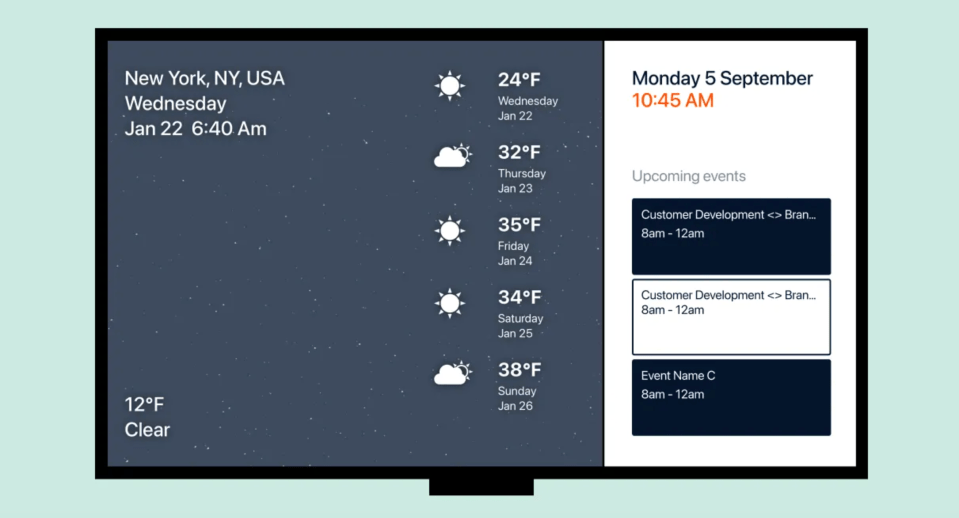
- News and Weather: Keep your customers informed while they wait. This is great for waiting rooms in salons or auto shops.
Design Tips for Non-Designers
- Keep it Simple: Don’t clutter the screen with too much text. Use the “3-second rule.” If you can’t read the main message in 3 seconds, it is too complicated.
- Use High-Quality Images: Blurry photos make your business look unprofessional.
- Use Video: Motion grabs attention. Even a subtle animation is better than a static picture.
- Call to Action: Tell the customer what to do. Examples include “Ask us about our specials” or “Follow us on Instagram.”
Step 4: Installation and Deployment

Once you have your plan, it is time to install.
With Kitcast, this process is painless.
- Mount your TV on the wall.
- Plug in your Apple TV, Amazon Fire TV Stick or Android TV.
- Connect to Wi-Fi.
- Download the Kitcast App from the app store on the device.
- Open the Kitcast Dashboard on your laptop and link the screen with the code shown on the TV.
That is it. You are live. You can now push content to that screen instantly.
Common Mistakes to Avoid
We want you to succeed, so let’s cover a few pitfalls to avoid.
Ignoring Location Place your screen where people actually look. Do not put it too high up or in a dark corner. Eye level is always best.
Forgetting to Update Nothing looks worse than a screen advertising a Christmas sale in February. Use Kitcast’s scheduling feature to set start and end dates for your campaigns.
Overloading the Playlist If you have 50 slides in a loop, no one will see them all. Keep your loops short and sweet. A 2 to 5-minute loop is usually ideal.
The Cost of Digital Signage
Budget is a major factor for small businesses.
Historically, digital signage cost thousands of dollars to set up. You had to buy servers, proprietary cables, and expensive software licenses.
With Kitcast, the barrier to entry is incredibly low. We know that every dollar counts when you are starting out.
That is why Kitcast offers a completely free plan for a single screen. You can set up your first professional digital sign without spending a dime on software. It is the perfect, risk-free way to test the waters and see the impact on your business before you commit to a larger deployment.
- Hardware: You can use a TV you already own and an Apple TV and an Android Fire TV Stick device
- Software: Kitcast offers flexible pricing plans designed for business growth. You pay a small monthly fee per screen.
When you compare this to the cost of printing, shipping, and installing paper signs, the Return on Investment (ROI) is usually positive within a few months.
Frequently Asked Questions (FAQ)
Q: Do I need a smart TV for digital signage?
A: No, you do not need a specific smart TV. Any TV with an HDMI port will work if you use an external media player like an Apple TV or Amazon Fire TV Stick running Kitcast.
Q: Can I manage my screens from home?
A: Yes. Kitcast is a cloud-based digital signage solution. You can log in to your dashboard from any computer or phone with an internet connection and update your screens instantly.
Q: Is digital signage difficult to set up?
A: Not with Kitcast. If you can plug in a TV and download an app, you can set up our digital signage. It is designed to be plug-and-play for small business owners.
Q: How much does Kitcast cost?
A: We offer competitive pricing tailored for businesses of all sizes. We also offer a free single-screen plan. Please visit our Pricing Page for the most current details and to start a free trial.
Guide to Digital Signage Zoning: Make The Most Of Your Screens

10 Best Digital Menu Board Software Solutions in 2026 (Ranked)